
A plumbing crew finishes a drain repair, confirms the sink empties properly, collects payment, and heads to the next call. The customer seems pleased, but nobody sends a review request. By the time the office remembers, the visit is no longer fresh in the customer's mind.
For a service business figuring out how to get more Google reviews, the cheapest starting point isn't another subscription. It's a reliable handoff between completed work and a short, neutral invitation, with a record of who received it and who opted out.
Why Every Completed Job Is a Review Opportunity
That drain repair already has a closeout process: the technician records the work, the office closes the invoice, and the payment reaches the account. The review request needs an owner and a trigger, just like those other tasks.
The opportunity is real. BrightLocal's 2025 Local Consumer Review Survey found that 96% of consumers were open to writing a review, but only 29% had written one during the previous year. Willingness doesn't automatically become action.
For HVAC, cleaning, landscaping, and pressure-washing businesses, the practical fix has three parts:
- Trigger: A completed, paid job becomes eligible.
- Invitation: Every eligible customer receives the same honest-feedback request.
- Log: The office records delivery, suppression, opt-outs, and any support follow-up.
A steady flow also keeps the profile useful to prospective customers. SearchLab's account of BrightLocal's 2025 findings reports that 20% of consumers said a review needed to have been posted within the previous two weeks to influence them. An old collection of praise doesn't describe current service as clearly as recent feedback does.
The first action is an audit, not a campaign. The office manager should pull the last 30 completed jobs and count how many customers received any review request. That working sample shows whether the immediate problem is missing requests, failed delivery, or customers choosing not to respond.
How to Build the Request Workflow Step by Step
Save the direct Google review link.
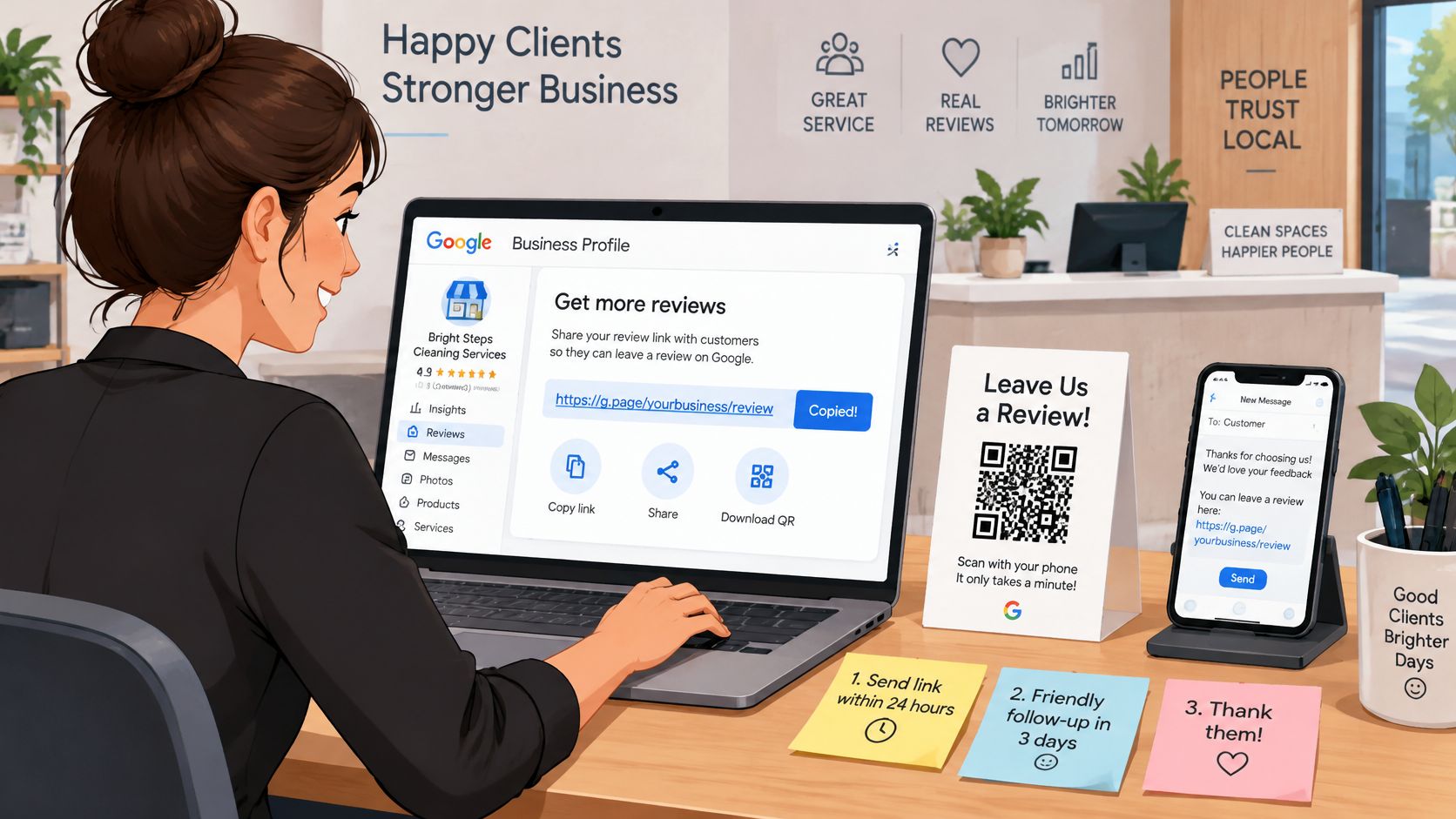
In the Google Business Profile management interface, the office manager should find the review-request option and copy the business's direct review link. Store it in a shared note accessible from a phone, along with a QR code generated from that same destination.Choose a clear closeout trigger.
Configure eligibility for when the job is marked complete and the invoice is paid, whichever happens last. That prevents a request from reaching a homeowner while a repair remains unfinished or a billing dispute is still being sorted out.Select the permitted channel.
Use SMS for customers whose consent permits that message, or email where appropriate. Email should be an alternative channel, not an automatic duplicate invitation after a text; the neutral-request rules also apply regardless of delivery method.Save a single invitation.
Keep the wording consistent across customers rather than letting technicians choose a warmer version for customers who seemed pleased. Include the business name, enough context to identify the visit, and the direct review link.Add customer-level suppression.
For recurring cleaning or lawn-care accounts, use a suppression window rather than treating every visit as a new opportunity to send another message. A 60 to 90 day suppression window is a practical starting point recommended in Whitespark's reputation-management guide.Record consent and enforce opt-outs.
Keep the customer identifier, job reference, consent record, send status, and opt-out status together. An unsubscribe must stop future review requests across the connected sending workflow, not merely remove someone from a spreadsheet.
Keep the message short
A proposed SMS template can be stored as:
Suggested invitation
Thanks for choosing [Business Name] for the recent service visit. If there's a moment to spare, please share an honest review of the experience: [Google review link]. Reply STOP to unsubscribe.
For email, use a recognizable sender name and a subject such as Feedback on the recent service visit. The body can use the same neutral invitation, with the review link clearly visible rather than buried beneath promotional offers.
The unsubscribe wording must match the sending system's actual behavior. A business shouldn't promise that STOP works unless its messaging provider processes it and the office can see the resulting suppression.
Leave incentives out of the setup
The FTC's Consumer Reviews and Testimonials Rule questions and answers explain that the rule took effect on October 21, 2024, and prohibits incentives conditioned on a particular review sentiment. The FTC doesn't categorically prohibit every incentivized review, but legally necessary disclosures must be clear and conspicuous.
For this workflow, the simpler policy is no reward attached to a Google review. Before activation, the office manager should send a sample job through the process, open the destination on a phone, check the business identity, and test the opt-out without posting a review.
Keep Requests Neutral and Route Unhappy Customers
Review request practices allowed and prohibited
| Practice | Status | Reason |
|---|---|---|
| One neutral invitation to every completed-job customer | Allowed | Avoids selective solicitation |
| Private satisfaction survey before sending the Google link | Prohibited when used to gate the invitation | Filters out customers likely to be dissatisfied |
| Discount, gift or free service for a review | Prohibited for Google and a risk under the FTC rule | Incentive tied to the review |
| Asking for a specific star rating or keywords | Prohibited | Requests specific review content |
| Requiring a review while on the premises | Prohibited | Google policy on pressure at the site |
| Routing unhappy customers to support with the public link still open | Allowed | Keeps the review path open for everyone |
The invitation should be identical for every eligible customer. Asking only customers who complimented the technician may appear efficient, but it changes an ordinary feedback process into selective solicitation.
Google's Maps user-generated content policy prohibits incentives for reviews, selective solicitation of positive feedback, discouraging negative reviews, and pressuring customers to provide particular content. It also prohibits requiring customers to review while on the premises.
A private satisfaction survey isn't the problem. The prohibited practice is using its answers to decide who gets access to the public review invitation. A customer reporting a missed cleaning task must retain the same opportunity to review as a customer praising the crew.
Separate service recovery from public feedback
The office needs a complaint route that doesn't interfere with the review route. The Cheers compliance playbook recommends a universal invitation branch, logged consent and opt-outs, and support handling that doesn't block public reviews.
A practical internal service standard is to assign a complaint to a named office contact within one business day. That person should confirm the problem, arrange a call or return visit, and record the resolution in the job history.
Any credit should address the service failure, not purchase a favorable outcome online. A missed room on a cleaning visit can justify a correction or credit whether the customer posts praise, criticism, or nothing.
Service recovery rule: A refund pays for a service problem. It must never buy a review, revision, or removal.
A suggested public response is:
Sorry the visit did not meet your expectations. Please call our office at the number on your invoice so we can make it right.
Where appropriate, the reply can acknowledge the service category, such as the plumbing visit, without identifying an address, payment dispute, access arrangement, or other private detail. Staff shouldn't argue through the business profile or ask the customer to remove criticism before receiving help.
Audit the automation monthly
A high positive-review total isn't proof that the process is healthy. If staff have started excluding difficult jobs, the numbers can look better while the workflow becomes less defensible.
The monthly check should cover:
- Invitation branch: Every eligible customer follows the same public-review route.
- Message wording: No technician-specific request for praise, stars, names, or keywords has appeared.
- Opt-out records: Suppressions remain effective after imports, contact merges, and software changes.
- Incentives: No discount, gift, contest entry, or free service is attached to reviewing.
- Support ownership: Complaints reach a named person rather than an unattended inbox.
- Public access: A complaint never causes the Google review link to disappear.
Employee coaching should focus on completed service, accurate closeout records, and correct request handling. Positive-review quotas create the wrong incentive for the people deciding which customers enter the workflow.
Measuring Results Without Chasing a Review Count
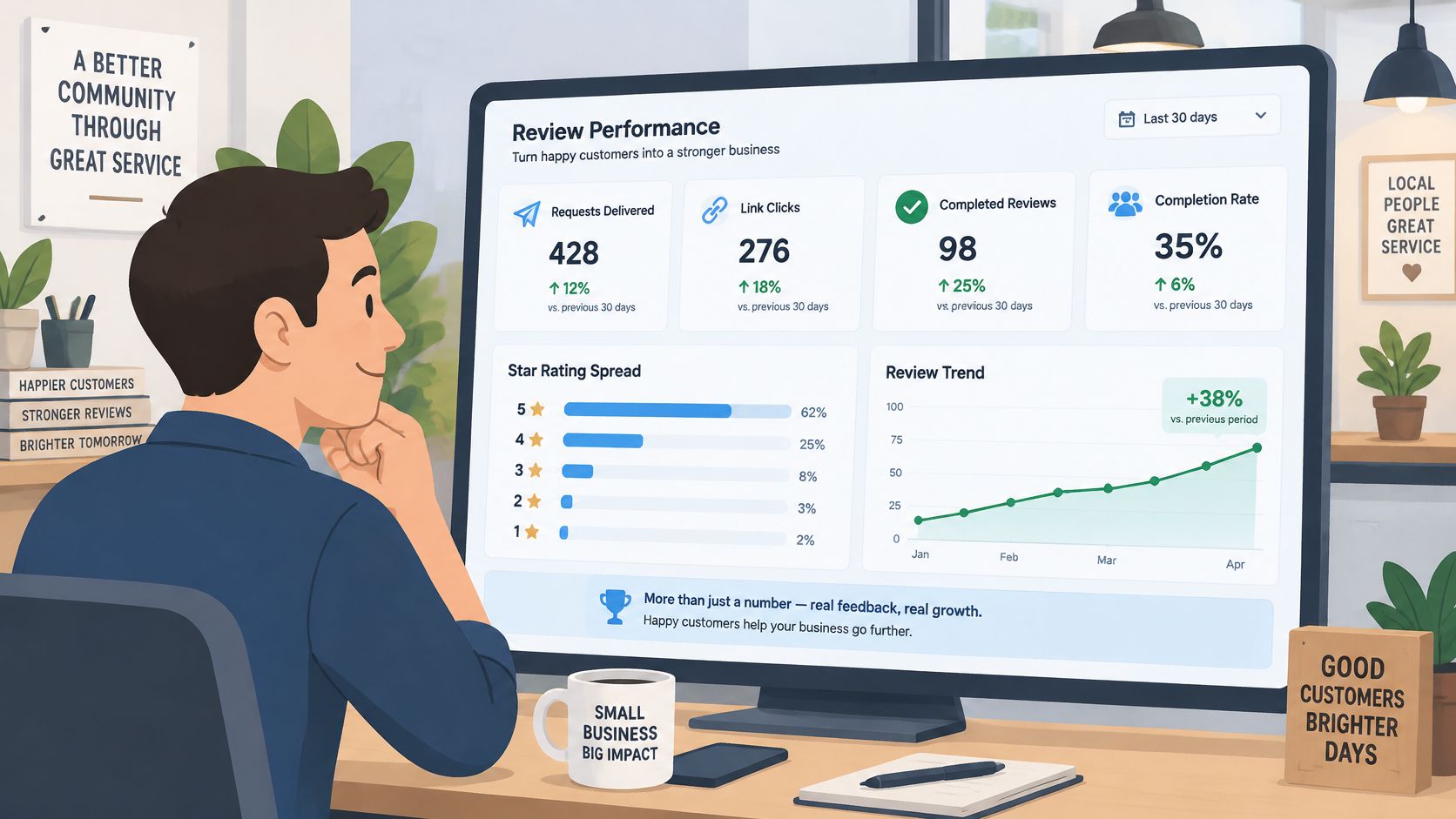
The office dashboard should show more than new reviews:
- Delivery: Requests sent, delivered, and rejected.
- Engagement: Link clicks and completed reviews where attribution is available.
- Feedback quality: Rating distribution and recurring service issues.
- Response handling: Time taken to reply to each public review.
- Business outcomes: Calls, quote requests, booked work, and repeat bookings by service type.
A monthly total can't explain whether customers received the invitation or whether the office completed more jobs. Wix's guide to SEO for service businesses supports evaluating review activity alongside service-specific customer behavior rather than treating review volume as the whole result.
Compare similar jobs
During a staged rollout, compare completed jobs that received requests with comparable jobs that didn't in the same month. Group them by service type, geography, and new versus returning customer, then inspect booked work and repeat bookings.
That comparison is directional, not proof that a review invitation caused revenue. Existing customer loyalty, job value, and seasonal demand can differ between groups; a customer who hasn't consented to texts also shouldn't receive one merely to balance a test.
Detailed feedback about a drain repair or recurring lawn treatment may help a prospective customer understand the service. Staff can analyze those naturally occurring details without instructing customers to include them.
A sudden concentration of favorable ratings after staff begin choosing recipients deserves an immediate workflow check. Each week, the office manager should open the profile, reply individually to new reviews, inspect delivery and cohort results, and record a single proposed change for the next monthly test.
Timing Tests That Find the Best Send Window
The best send window depends on when the customer can evaluate the work. A repaired electrical circuit may be easy to assess immediately; a lawn treatment may take longer to judge.
A useful test assigns eligible jobs to timing groups without selecting customers by apparent satisfaction. The office can run all five groups each month for at least two months before changing the default.
| Timing group | Operational setup |
|---|---|
| On-site | Send an optional invitation after closeout, without waiting for the customer to review |
| Same day | Send later on the service date after eligibility is confirmed |
| Three days later | Schedule from the recorded closeout event |
| One week later | Keep the visit identifiable in the message |
| Two weeks later | Check that no subsequent request or opt-out overrides the scheduled send |
These are test conditions, not universal response benchmarks. Every group should use the same invitation so a timing change isn't mixed with a wording change.
Compare rates and customer friction
Track requests sent, link clicks, completed reviews, response rate, average rating, and unsubscribes for each group. Calculate completed-review rate against delivered invitations where delivery reporting exists, and document that denominator so the office doesn't compare incompatible figures.
SMS and email need separate comparisons. A channel can appear to perform better because it reaches different customers, so the office should also segment by trade, technician, job type, and time between completion and request.
The winning send window produces more completed reviews without increasing opt-outs or complaints. It isn't simply the window with the highest average rating.
For a hypothetical lawn-care company, the delayed group might perform better because customers have had time to inspect the property. For a same-day electrical repair, the optional on-site invitation might be more useful, provided the technician doesn't hover over the customer or make reviewing part of payment.
A generic database blast makes these comparisons harder. Recipients may be remembering different visits from different seasons, and repeat customers may receive an invitation unrelated to their latest work.
After both monthly runs, the office should change the default only if the result remains reasonably consistent. Where the customer base is too small for a clear pattern, maintaining a sensible default is better than declaring a winner from a handful of responses.
Choose a Review Tool Once the Workflow Runs
Review tools for small service crews
| Vendor | Best fit | Review request scope to evaluate |
|---|---|---|
| NiceJob | Owners seeking review requests and reputation tools as the core product | Review requests and review monitoring |
| Thryv | Small businesses seeking listings, phone, and reputation tools together | Review requests within a broader marketing suite |
| Housecall Pro | Field service crews managing jobs, quotes, and invoices in one system | Requests connected to completed-job records |
These are different purchasing decisions. NiceJob belongs on the shortlist when reputation management is the main gap. Thryv is a candidate when the owner also wants broader customer communication and marketing functions, while Housecall Pro is relevant when review requests need to sit alongside field-service administration.
No current subscription figures are stated here. A purchasing decision requires the vendor's current published plan terms, including whether the required review functions are included or sold separately; an unverified price shouldn't become a budget assumption.
Start smaller when the office can maintain it
An owner-operator may be better served by a saved Google review link, an approved message, a calendar task, and a shared spreadsheet. That avoids buying a broader system solely to send an invitation, although someone must still check eligibility and maintain suppressions.
A larger crew benefits from automation when manual closeout becomes unreliable. The important demonstration isn't a polished dashboard; it's whether the system correctly handles a recurring customer, a duplicate contact, a complaint, and an opt-out.
Before purchase, the office manager should require a demonstration of:
- Neutral routing: The same invitation goes to every eligible customer.
- Suppression: Repeat visits don't generate unwanted repeat requests.
- Opt-out logging: Staff can see and enforce the customer's preference.
- Monitoring: Someone can identify new reviews and assign responses.
- Trigger accuracy: Requests follow the actual completed-work event rather than an estimate, appointment booking, or unfinished job.
The next step is concrete: choose one tool or no tool, assign an office owner, and run the workflow for 30 days. Then review delivered requests, completed reviews, opt-outs, and support handling before buying more automation or changing the process.