
Basic starts at $59 per month billed annually or $79 month to month. Essentials starts at $149 annually or $189 monthly for up to 5 users, while MAX starts at $299 annually or $329 monthly for up to 8 users, with extra users on MAX priced at $35 per user per month. All figures come directly from the Housecall Pro pricing page read on September 24, 2026, although other public sources still list conflicting extra-user rates.
That makes the surprising part of Housecall Pro pricing less about the entry price and more about the point where a business outgrows its included seats. A solo pressure washer may fit Basic, but a small plumbing crew can move quickly into a different cost bracket. Public coverage also contains inconsistent information about extra users, so contractors should treat the vendor's current pricing page and terms as the controlling references.
Understanding Housecall Pro Pricing at a Glance
Housecall Pro's sticker price is only the first point on its cost curve. The vendor pricing page separates plans by included user capacity: Basic allows one user, Essentials supports up to five, and MAX supports up to eight. That distinction determines how quickly a growing contractor may move from an entry plan to a higher subscription tier. These figures come from the Housecall Pro pricing page read on September 24, 2026.
The published annual-billing prices are $59 per month for Basic, $149 per month for Essentials, and $299 per month for MAX. Monthly billing lists $79 for Basic, $189 for Essentials, and $329 for MAX. MAX also lists $35 per user per month for extra users.
The practical fit is straightforward:
- Basic: one account for a solo operator.
- Essentials: several user accounts for a small crew.
- MAX: more included seats, with the option to add users beyond the stated limit.
A contractor should compare the included seats with the actual people who need access, rather than evaluating the monthly price alone. A second field worker, dispatcher, or office administrator can change the relevant plan decision, even if the business still has modest revenue or job volume.
The pricing page also advertises a 14-day free trial. Housecall Pro states that a card isn't required to start it, allowing owner-operators to test scheduling, invoicing, customer management, and payment workflows before beginning a recurring subscription. Trial conditions and account closure rules require separate review, so the absence of a card should not be treated as proof that every later billing condition is risk-free.
Public coverage contains conflicting extra-user figures. One recent breakdown lists $100 per month on Essentials and $75 per month on MAX, while another software page lists $35 per user per month on MAX. Those figures cannot all represent the same current structure. Contractors should use the vendor page as the primary reference and verify any quote against the written order terms.
Housecall Pro Subscription Tiers and Feature Limits
Housecall Pro's published tiers are separated mainly by included user capacity. Per the vendor pricing page read on September 24, 2026, the listed figures are:
| Plan | Annual Price | Monthly Price | Included Users | Extra User Fee |
|---|---|---|---|---|
| Basic | $59/month | $79/month | 1 user | Not stated on the vendor pricing page |
| Essentials | $149/month | $189/month | Up to 5 users | Not stated on the vendor pricing page |
| MAX | $299/month | $329/month | Up to 8 users | $35/user/month |
Basic is priced for one operator
Basic's one-user limit suits a solo handyman, pressure washer, painter, or lawn-care operator who manages both office and field work. Its annual price is the lowest published entry point, but the tier offers no intermediate seat option before the next plan.
That creates a capacity decision as soon as the business adds a helper, dispatcher, or office administrator. The owner must confirm whether the additional person requires a plan upgrade, whether the necessary permissions are available, and whether any required functions carry separate charges.
Essentials marks the small-crew threshold
Essentials supports up to five users at $149 per month annually or $189 month to month. That capacity can cover an owner, an office user, and field staff at a small HVAC, plumbing, cleaning, or pest-control company.
A sixth user changes the calculation. Essentials would exceed its stated included capacity, while a recent independent breakdown reports an extra Essentials user charge of $100 per month. Because that amount is not displayed consistently in the public pricing material cited here, contractors should obtain written confirmation before selecting the tier.
MAX publishes an extra-user charge, but public figures conflict
MAX includes up to eight users. The current vendor pricing page lists $35 per additional user per month. Another recent breakdown reports $75 per month for MAX extras, and a separate field-service software page also lists the $35 amount.
The discrepancy matters for a larger operation. An electrical or landscaping company with 11 users would need to budget for seats beyond the included limit, so the difference affects the subscription estimate rather than merely the wording of a comparison article.
Practical rule: Compare each tier by included seats, the charge after those seats are used, and the selected billing mode.
The vendor's current public figure should establish the starting estimate, but the contractor should retain the quote or order summary. Public coverage already shows conflicting extra-user amounts, and pricing pages can change. A plan comparison is therefore incomplete if it shows only the headline subscription price.
Housecall Pro Free Trial and Account Closure Rules
The 14-day free trial has a specific account-closure rule that contractors should verify before entering payment details. Housecall Pro states that no payment method is required to start the trial, according to its pricing page. An owner-operator can therefore test the workflow without supplying card information at signup.
The account outcome depends on whether payment details are added. Housecall Pro's billing and account-management help page states that an account closes automatically after the trial ends when no payment method has been added. Users who enter payment details during the trial must contact Housecall Pro to cancel instead.
Housecall Pro lists two support routes for that request:
- In-app chat, accessed through the account.
- Phone support, using the contact route supplied by Housecall Pro.
That distinction creates two different administrative tasks. Without payment details, the account follows the stated automatic-closure rule. With payment details, the business should set a cancellation reminder before the trial ends and keep the support confirmation.
The trial does not establish the final subscription cost. Before conversion, confirm the selected tier, included users, extra-seat charge, billing terms, and add-ons. The trial can show whether the workflow fits the business, but it cannot resolve unclear commercial terms. Written confirmation is the safer record when public pricing information and account-specific charges do not align.
Annual Versus Monthly Billing Costs
Housecall Pro's billing choice changes the published rate at every tier. The pricing page read on September 24, 2026 lists Basic at $59 annually or $79 monthly, Essentials at $149 or $189, and MAX at $299 or $329.
The monthly differences are straightforward:
- Basic: month-to-month billing costs $20 more per month.
- Essentials: month-to-month billing costs $40 more per month.
- MAX: month-to-month billing costs $30 more per month.
Those figures describe the base subscription, not necessarily the total cost for a working crew. An Essentials account that needs users beyond its included capacity can produce a higher effective monthly cost, and public coverage does not consistently identify the applicable extra-seat rate. The contractor should request a written total for the expected team size before treating the advertised tier price as the budget figure.
Billing choice also changes the financial risk. A cleaning company with stable recurring work may prefer the lower annual-equivalent rate. A seasonal pest-control or lawn-care business may accept the higher monthly rate to limit its commitment while staffing and job volume remain uncertain.
The useful comparison is the connection between cash-flow flexibility, crew stability, and the expected period of use. A company staying on one tier for a predictable period may benefit from annual billing. A company expecting new hires, a tier change, or a system replacement should evaluate the commitment before selecting it.
The lower annual figure matters only when the business can carry the commitment and the plan will still fit the crew.
Ask for the recurring total, included users, extra-seat charges, and billing term together. That exposes the full cost curve more accurately than comparing headline prices alone.
Hidden Costs and Unpublished Terms
The sticker price excludes several costs and contract terms that can affect a contractor's margin. Housecall Pro's public material describes the trial structure, while its Housecall Pro Terms & Conditions state that each chargeback carries a non-refundable $25 fee, regardless of the dispute outcome.
That fee sits outside the subscription. A plumbing or HVAC company accepting card payments should confirm how disputes are handled, who supplies supporting documentation, and how the payment workflow assigns responsibility.
The public material reviewed for this article leaves several commercial questions unanswered:
- Setup fees: The reviewed pages do not clearly state whether every customer pays a setup or onboarding fee.
- Cancellation: The help content explains cancellation for trial users who entered payment details. Buyers should confirm the process for an active paid account.
- Data after cancellation: The reviewed pages do not fully explain how long customer records, job history, attachments, and payment-related data remain accessible.
- Processing charges: The available material does not provide a complete, current schedule for every payment method or transaction type.
- Messaging and add-ons: Recurring-service tools, higher-volume customer messaging, integrations, and other functions may need separate confirmation before purchase.
The main website describes the platform and its services, but marketing copy does not replace the contract or billing schedule. That distinction affects contractors because software costs flow through job margins and cash flow, not just the advertised subscription.
Request written answers before signing:
- Is there a setup or onboarding fee?
- What is the exact cancellation process for a paid account?
- Which data can be exported, and when is access removed?
- Which payment and messaging fees apply to the selected workflow?
- What extra-user rate appears in the order form?
These answers expose costs that the public pricing page may not show. They also create a documented basis for comparing the expected crew cost with other field-service tools.
Housecall Pro Pricing Compared to Similar Field Service Tools
Housecall Pro is easier to compare with Jobber, ServiceM8, GorillaDesk, Thryv, Workiz, Contractor Foreman, and ServiceTitan by examining how each product's bill changes as a business grows. The verified material available here does not establish current subscription figures for those alternatives, so attaching borrowed starting prices would make the comparison unreliable. Check each vendor's pricing page on the same date before building a cost table.
The relevant questions are structural:
- Crew access: Does the plan cover one user, a fixed group, or a wider seat allowance?
- Feature scope: At the selected level, are scheduling, quoting, payments, recurring work, reporting, and integrations included?
- Growth cost: Does the invoice increase through additional users, higher tiers, add-ons, processing charges, or a custom quote?
A solo painter or handyman may fit a single-user plan, while a five-person HVAC or plumbing company needs to confirm how many seats are included and whether office staff count separately from technicians. A landscaping or electrical company operating multiple crews should obtain written terms for added users, locations, permissions, and dispatch access.
The operating model changes the comparison. ServiceTitan is typically assessed by larger, more complex service operations. ServiceM8, GorillaDesk, and Jobber are commonly considered by smaller service businesses. Thryv and Workiz become relevant when customer communication, sales, or broader business management sits alongside field scheduling. Contractor Foreman may suit companies comparing project controls with field workflows.
These categories identify fit, not a universal winner. Housecall Pro's published structure is most useful when a buyer can match the operation to an included-seat tier and then calculate the added-user cost. An alternative may fit better if the business needs a different seat model, trade workflow, or contract arrangement. The comparison should therefore track the full cost curve, not just the lowest advertised entry point.
Migration and Import Considerations
A lower subscription price won't compensate for a poor data move. A contractor leaving spreadsheets or another field-service platform should ask Housecall Pro what can be imported before the trial ends, then separate transferable records from information that must be rebuilt manually.
The vendor should answer these questions in writing:
- Customer records: Can names, addresses, phone numbers, email addresses, and property notes be imported?
- Job history: Can completed jobs, invoices, estimates, attachments, and service notes move across?
- Recurring work: Can recurring service plans and next-service dates be preserved?
- Payment data: Can stored payment details be transferred, or must customers re-enter them?
- Permissions: Can office staff, technicians, and owners receive different access levels?
- Templates: Can estimate, invoice, reminder, and notification templates be imported?
A spreadsheet often contains customer names and contact details but not the relationships between properties, jobs, invoices, recurring visits, and payment records. An older platform may hold more history, but the export format and field mapping still determine how much cleanup the business will need.
The safest process is to request a sample import or written field map before committing. The business should also retain an export from the old system, identify the records that must remain available for accounting or customer-service reasons, and confirm who performs the migration.
Migration checkpoint: Never assume that an export file means a complete operational transfer. Confirm the fields, history, attachments, recurring plans, and permissions separately.
Who Should Choose Housecall Pro Based on Crew Size
Housecall Pro's structure fits a specific progression. Basic is most naturally aligned with a solo pressure washer, handyman, painter, or lawn-care operator who needs one login. The one-user limit is the important commercial fact, not the low annual starting price.
Essentials becomes the relevant breakpoint for a small team. A five-person plumbing, HVAC, cleaning, or pest-control operation can fit within the published included capacity, while a business with a sixth user needs to investigate the applicable extra-seat charge or consider a higher tier.
MAX makes more sense for a growing landscaping, electrical, or multi-crew operation that needs access for more people. It includes up to eight users, then the vendor's current pricing page lists $35 per additional user per month. Public coverage reports other figures, so a larger business shouldn't approve a budget without a written rate.
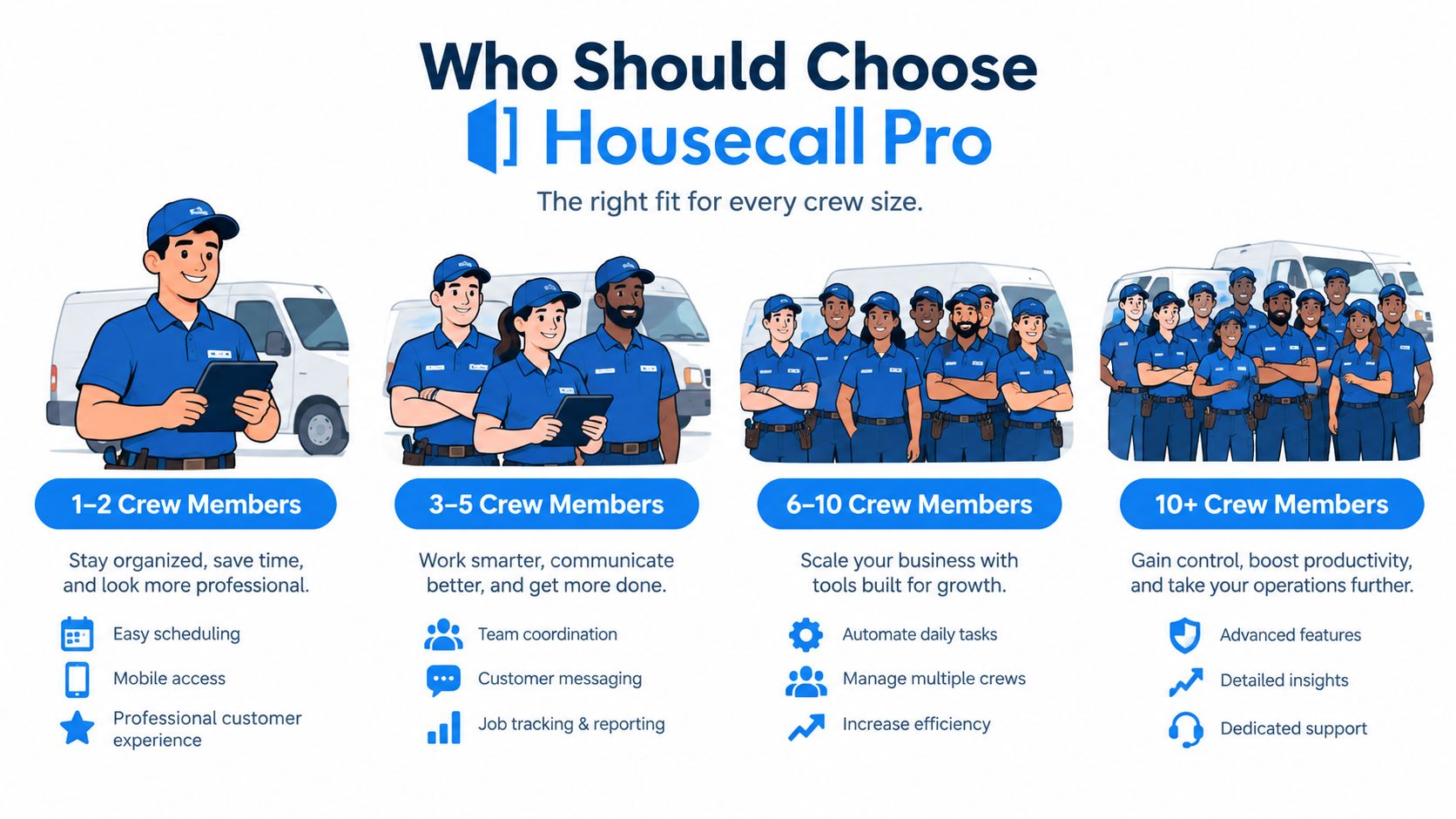
The strongest cost fit depends on how quickly the crew may grow. Basic can be economical for a true one-person operation, but it offers little seat flexibility. Essentials can cover a small crew, yet the cost after the included seats is less predictable because public figures conflict. MAX provides more capacity, but added users and payment-related costs still need separate review.
The 14-day trial without a required payment method gives each business a controlled way to check workflow fit before choosing a tier. It doesn't remove the need to verify cancellation, data access, and extra-user terms.
Quick Reference Table for Housecall Pro Pricing
The table consolidates published subscription figures, included users, trial terms, and the stated chargeback fee. Basic and Essentials do not show extra-user pricing, while MAX lists a per-user charge.
| Plan | Annual Price | Monthly Price | Included Users | Extra User Fee | Trial Length | Chargeback Fee |
|---|---|---|---|---|---|---|
| Basic | $59/month | $79/month | 1 | Not stated | 14 days | $25 per chargeback |
| Essentials | $149/month | $189/month | Up to 5 | Not stated | 14 days | $25 per chargeback |
| MAX | $299/month | $329/month | Up to 8 | $35/user/month | 14 days | $25 per chargeback |
The subscription figures, user limits, and trial length come from the Housecall Pro pricing page read on September 24, 2026. The chargeback term comes from the Housecall Pro terms. Prices shown as annual are monthly rates under annual billing, so the table does not represent a single upfront annual payment. Extra-user costs for Basic and Essentials remain unstated here, leaving the total cost for larger teams unresolved.
Methodology and Source Notes
The pricing figures come from Housecall Pro's published pricing page read on September 24, 2026. It lists Basic at $59 annually or $79 monthly, Essentials at $149 annually or $189 monthly, and MAX at $299 annually or $329 monthly, plus included users and MAX's extra-user charge.
Housecall Pro's billing and account-management documentation supplies the account-closure rules. A trial closes automatically after 14 days without a payment method. Accounts with one require cancellation through in-app chat or by phone.
The vendor's Terms & Conditions state that the chargeback fee is non-refundable and applies to each chargeback regardless of outcome. This analysis does not use market forecasts, review counts, ratings, or third-party market statistics.
Public coverage conflicts on extra-user pricing. One recent breakdown reports $100 per month for added Essentials users and $75 per month for added MAX users. Another source, along with the current vendor page, lists $35 per month for added MAX users. Obtain the applicable seat charge in written order terms before payment.
Before the trial, map crew size, planned hires, billing preference, payment workflow, and migration fields. Use the 14-day period to confirm the plan and request written answers on extra users, cancellation, data access, payment charges, and setup costs. Compare the resulting total with Jobber, ServiceM8, GorillaDesk, Thryv, Workiz, Contractor Foreman, and ServiceTitan using each vendor's current pricing page.