The 2 p.m. call moves to 9 a.m. because the homeowner has a gas inspection at noon. The dispatcher fires off a group text at 8:40. One technician is under a crawlspace with no signal and never sees it. He pulls up to the old address at 2:15, the customer is annoyed, and the office spends the rest of the day rebuilding the route by phone.
That small failure is the whole subject. When the rules for which message takes which path are missing, people invent their own. Their own usually means a personal text on a personal phone, where the office can't see it and can't find it three weeks later.
Field work is mostly not wrench time. Salesforce research covering more than 5,500 service professionals in 30 countries found that in 2024 mobile workers spent about 32% of their time interacting with customers, and 57% reported burnout, as reported in Energy Central's field service coverage. The other two-thirds goes to driving, waiting, paperwork, and working out which of four messages was the one that mattered.
Which Channel Handles Which Crew Message
A crew communication system is the set of channels a small trade business uses to send work instructions, urgent alerts, and day-to-day updates between the office and the people in the field. It isn't one product. It's a mix of tools plus a rule for which message goes where.
Most crews already run a mix, planned or not. In a 2017 manufacturing communications survey of more than 500 respondents across 47 U.S. states, 78% said most workers in their operation used multiple devices to communicate, and 71% called a dependable connection between those devices important or very important, according to the Motorola Solutions survey report. Two-way radios remained the primary method for 45% of those manufacturers, while 49% used digital radios or a combination of digital and analog. Against 2015, the radio share had increased by 13%.
That pattern holds in home service work. Radios didn't lose to phones. They got a narrower job.
| Channel | Best use | Works without cell data | Keeps a record |
|---|---|---|---|
| Two-way radio | Immediate voice alerts on site | Yes, within radio range | No, unless logged by hand |
| Citizens Band radio | Short-range voice between nearby vehicles | Yes, about 1 to 5 miles | No |
| Group messaging app | Schedules, photos and job notes | Usually no, needs data | Yes |
| Business phone call | Urgent one-to-one contact | Needs cell service | Only if logged |
| Field service software messaging | Customer and job-linked updates | Usually no | Yes |
Working rule: a channel that leaves no record is fine for voice and useless for anything a customer might dispute later.
Citizens Band sits at the far end of the same idea. The Federal Communications Commission describes CB radio as a private, two-way, short-distance voice service for personal or business activity, authorized on 40 channels from 26.965 MHz to 27.405 MHz, with roughly 1 to 5 miles of two-way voice range. That covers two vans in the same subdivision. It doesn't cover a dispatcher across the county, and it carries no photos, addresses, parts lists or searchable history.
Before comparing any product, write down the messages a crew sends in a typical week: the address change, the gate code, the before photo, the running-twenty-minutes-late note, the stop-the-panel-is-live warning. Match each one to a channel. Most crews find they need three, not one.
Core Features Small Crews Should Expect
A crew of one to twenty people needs a short list of things that work every day. Everything else on a vendor's feature page is either a convenience or a tool built for an operation with a call center behind it.
The eight that carry a working day
- Voice or push to talk. A technician on a roof or under a sink can't type. One press reaches dispatch, and a two-minute question stays two minutes instead of becoming a text thread.
- Direct and group messages tied to a job. Prevents the search through a forty-message thread to work out which customer an address belongs to.
- Photos with a timestamp and a job link. Prevents a disputed invoice when the customer says the driveway looked no different before the visit.
- Read receipts and a one-tap acknowledgment. Prevents the wrong-site visit that starts with "I thought you saw it."
- Change alerts sent only to the crew affected. Prevents waking six people at 6 a.m. for one gate code.
- Offline queueing. Prevents the message that sits unsent in a basement and lands at 5 p.m.
- Role-based alerts. Prevents a hazard notice from scrolling past in the same stream as lunch plans.
- Searchable history with export. Prevents the "who told whom" argument, and the loss of records when a technician quits.
The two to test hardest
Offline behavior and alerting are where marketing pages get quiet. NIST's research on industrial wireless defines latency as the delay between an event and the application receiving usable knowledge of it, and reliability as the probability that data arrives too late to be useful or is lost to noise. Metal vehicles, buildings, equipment and confined spaces cause signal loss and dropped transmissions. Test delivery at the farthest normal stop, inside basements, and in tight neighborhoods, not in the office parking lot.
Alerting carries its own standard. OSHA's emergency preparedness guidance treats effective alerting as a core element of site safety, names portable radios and public-address systems among acceptable tools, and requires that every worker understand the method. Two-way chat that never reaches an absent technician fails that test.
Rank the eight features by how often a specific crew would touch each one, then drop the rest, including approval chains, multi-level permissions and territory rules built for fifty-truck operations.
How Office and Field Use the System Each Day
A system earns its place in the ordinary hours, not the emergency. Here is what a working day looks like when the office and the field share one sequence.
Take a two-technician HVAC crew running four calls each.
- The evening before. The office posts tomorrow's route with addresses, gate codes, parking notes and any access restrictions, so nobody arrives to a locked lobby.
- Acknowledgment. Each technician confirms the schedule in the app or by radio. The dispatcher now knows who has seen it and who is still driving home.
- On arrival. The technician logs a start photo and a status note tied to the job, which fixes the time and place of arrival in the record.
- The mid-day change. A cancellation or a new gate code goes only to the affected technician and needs an acknowledgment. Everyone else keeps working.
- Before leaving. The technician marks completion, uploads the after photo, and notes any part needed for the next visit.
- The customer confirmation. The office sends a text generated from the job record, so the customer hears from the business rather than the technician's personal phone.
A lawn care or pest control route runs the same six steps with a different order of stops. The stop sequence moves all day; the acknowledgment and the photo don't change.
A device in every hand isn't the same as a system. In a Frost & Sullivan study cited in a Microsoft frontline workforce report, 68% of companies had invested in mobile phones or tablets for frontline workers, yet nearly one-third said their frontline workers were still not fully equipped or digitally supported.
Test the sequence rather than assuming it. Send a schedule change at 10 a.m., note when each technician acknowledges it, and compare that to the time the same change takes by phone calls today.
Routing Urgent Alerts Without Relying on One App
Some messages carry consequences that a schedule change doesn't. Deloitte's digital workplace research reported that 82% of frontline workers believe better technology and controls would improve productivity through stronger safety and communication, and that workers can lose roughly 24 minutes per shift waiting on safety-critical information or approvals.
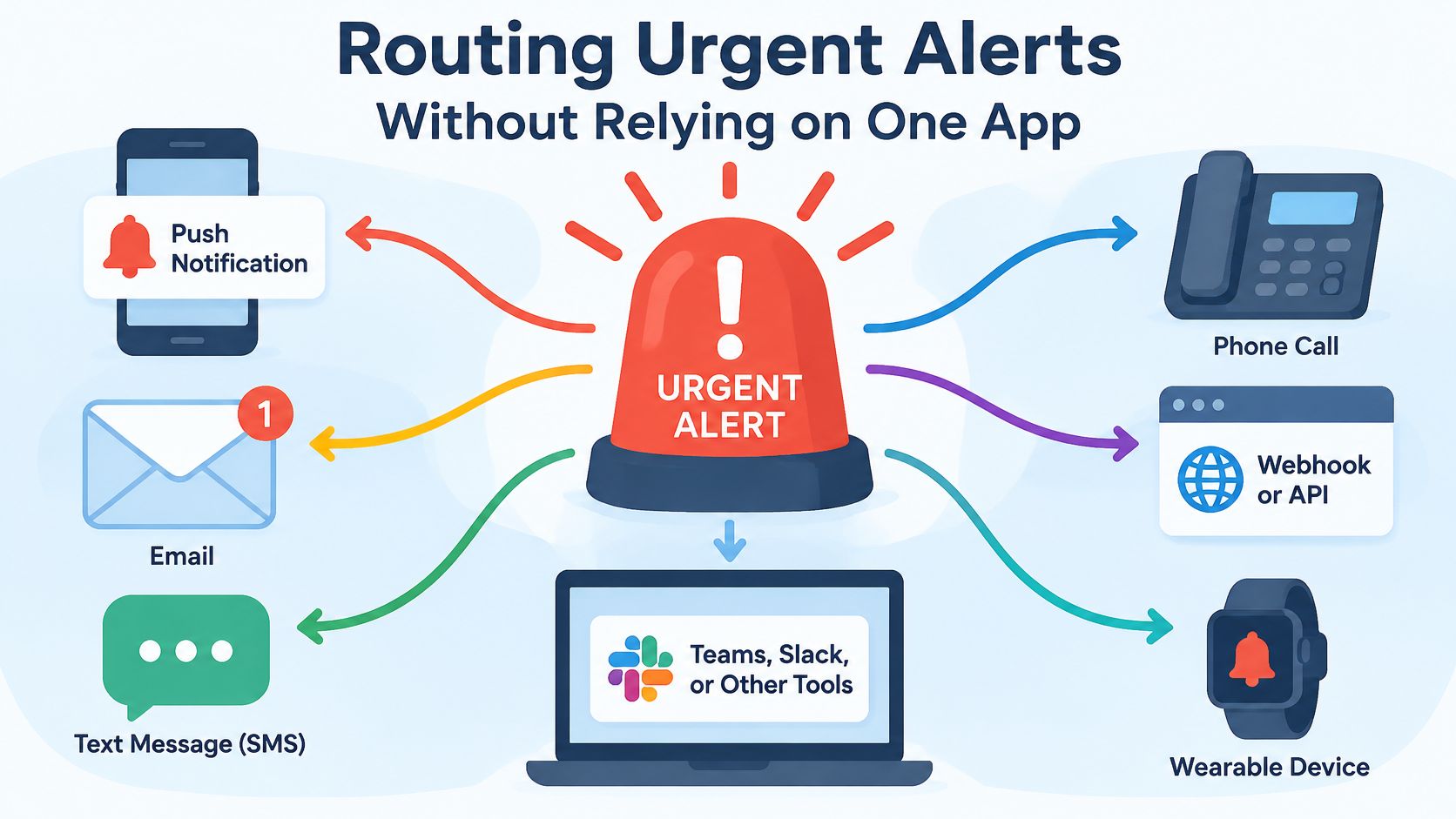
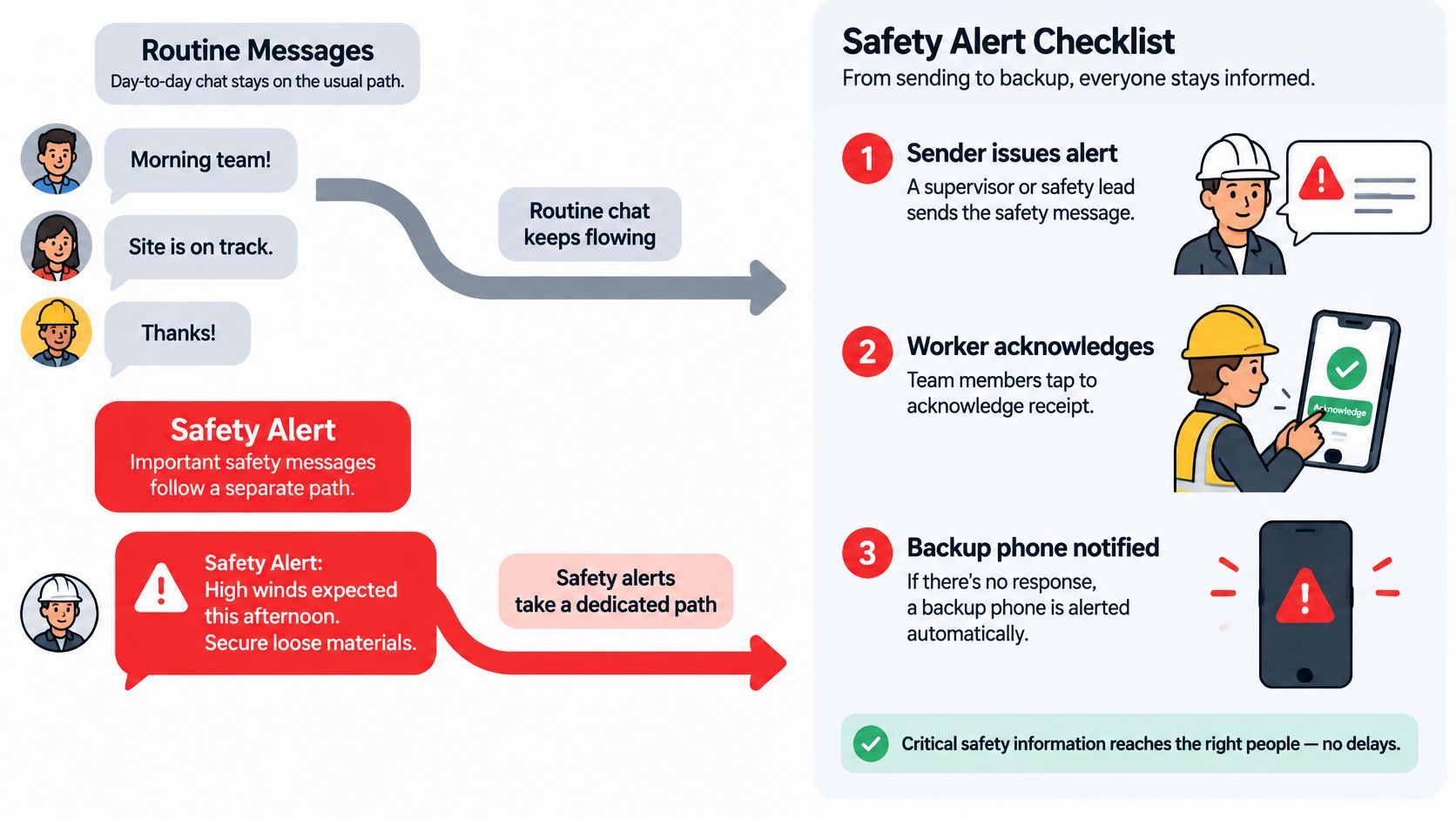
A group chat can't carry an emergency plan on its own. OSHA's workplace emergency planning guidance calls for a preferred method of reporting fires and other emergencies, primary and secondary escape routes, and a system for notifying employees of an emergency, along with notification and warning procedures and accountability procedures. Translated to a five-person crew, those elements become four plain questions: who sends the alert, how each worker acknowledges it, how the supervisor accounts for everyone on site, and which backup channel still works when cellular data or the app is down.
That last question is the one most systems skip. A chat app is a single point of failure dressed up as a safety channel, because every message rides the same network, the same device and the same notification setting the crew may have muted.
Split routine from urgent
Routine traffic, meaning schedules, job notes, photos and arrival times, belongs in messaging, where it leaves a record. Emergencies belong in voice: an electrical hazard, a lockout on live equipment, a weather stop that ends the day, a lone-worker injury, or a customer access problem that stops work entirely.
The timing bar differs by setting but the logic doesn't. Fraunhofer's research on safety-critical industrial wireless identifies sub-1-millisecond latency as a requirement in machine-control scenarios, where losing a safety packet can trigger an emergency stop. A plumbing crew doesn't need that speed, but the same cause runs through it: a missing dispatch change costs a wrong-site visit, and a missing hazard warning costs an injury.
Practical rule: give every job a named incident lead, and decide in advance how long an unacknowledged urgent alert waits before it triggers a phone call.
A workable model has three parts. Every worker on site carries something that can raise the alarm and take instructions back, a cellphone route to 911 stays in place, and a named manager owns internal instructions. The device matters less than the coverage it gives. A two-way radio still reaches a crew inside a mechanical room or a steel structure where a phone shows no bars, while a direct call reaches a lone worker driving between stops. What counts is that each person can both send an alert and receive one through at least one channel that survives when the app doesn't.
Three questions settle most vendor claims. How does dispatch mark a message as safety-critical? Can dispatch see who has not confirmed it? What is the measured escalation time, and how does the system retry when a phone drops offline in a mechanical room?
Getting Crews to Adopt the System and Its Rules
Crews drift to personal texts for a reason that has nothing to do with software quality. An official app that tracks location, pings after hours and flags unread messages feels like supervision, so the people using it route around it. Every mandatory notification added to win back control tends to push more of the conversation into a channel the owner can't see.
The trade-off is control against adoption, and adoption wins on practical grounds. A technician who mutes the app still has the customer's gate code in a text message nobody else can read.
Choose the rule the crew would defend in a break-room argument, then write it down.
Three settings do most of the work. Keep routine notifications opt-in so people choose what interrupts them. Let a technician keep a work identity separate from a personal number. Limit after-hours contact to genuine emergencies, and say so in writing.
Before rollout, draft a one-page policy that answers these questions:
- Acceptable use. Which channels are approved for customer information, and which are not.
- Emergency contact rules. Who may call whom, at what hours, and through which channel.
- Personal device use. Whether reimbursement applies when a worker uses their own phone.
- Photo and record ownership. Who owns customer photos and chat history.
- Retention. How long messages are kept, and when they are deleted.
- Exports. How records leave the system when an employee does.
During the trial, ask each crew member which channel they use for each message type and write the answers down. The gap between the policy and those answers is the training plan.
Crew Communication Software Options to Compare
Compare the plan an owner would buy, not the feature grid at the top of the page. For a crew of one to ten, the key question is whether scheduling, job notes, photos, customer texts and an invoice can sit in one app, while an urgent alert still has a louder route than routine chatter.
Plan names and entry prices move often, so treat any posted figure as a starting point and check what that plan includes at your crew size. A solo operator or a two- or three-person pressure washing, cleaning or handyman shop can usually start with the simplest plan that covers scheduling and job-linked photos. Larger HVAC and plumbing crews that need dispatch and invoicing together should compare plans that bundle both at the crew size they run.
| Vendor | Likely fit by crew size |
|---|---|
| Housecall Pro | Small to mid-size crews |
| Jobber | Owner-led crews of one to ten |
| ServiceM8 | Mobile-first crews of two to ten |
| GorillaDesk | Small contractor shops |
| Workiz | Growing field teams |
| Contractor Foreman | Small construction crews |
| ServiceTitan | Large operations with many technicians |
Read the table as a shortlist, not a verdict. When two or three options remain, compare how each one handles photos attached to a job, customer texts, and a message that has to be answered fast. A platform can look complete in a demo and still bury the urgent message under routine updates, so the safety channel deserves its own yes-or-no check during the comparison.
Confirm These Points Before You Buy
Communication breakdowns cost real hours, and the number is large enough to justify a careful trial. In 2025, 50% of contractors reported that crews spent 1 to 3 hours per week on nonproductive tasks including communication breakdowns, according to AlignOps' State of Construction Operations report.
Run this check inside a demo or trial, in this order:
- Send an urgent alert to a phone in a basement and time how long it takes to arrive.
- Confirm read receipts and a one-tap acknowledgment work without typing.
- Test offline behavior by putting a test phone in airplane mode, sending a message, and restoring signal.
- Verify role-based alerts so routine chat doesn't wake the whole crew at 5 a.m.
- Ask for export and retention terms, including how long message history is kept and what happens to it when someone leaves.
- Request delivery rates and escalation times in writing, not just a coverage map.
Get the trial length, minimum seats, billing period, cancellation terms and post-cancellation data handling in writing before signing. Read each vendor's own pricing page rather than a roundup, because plan names and figures change without notice.
The rule to carry away is simple. Use the cheapest, easiest channel for routine work, and never let that channel be the only path for a safety message.
The next step is small enough to finish this week. Pick one voice backup and one messaging tool, write the one-page policy naming who sends an urgent alert and how long it waits before a phone call, then test both at the address with the worst signal on the route. Owners who want a shorter list before booking demos can use JobsiteStack's "Which software fits my business" tool. It asks for the trade, crew size and what the software has to do, then returns up to four platforms that meet all three answers with the cost at that crew size.