The plumber has finished the water heater replacement, but the office still has to find the approved estimate, check whether the deposit cleared, add an extra fitting and send the balance. Meanwhile, the customer thinks everything was paid at the visit. The problem isn't the invoice's appearance. It's the missing connection between the job, the bill and the money.
Plumbing invoicing software should function as a cash-collection and control system, not just a document generator. For owners and office managers, the useful questions are practical: Can the business bill its actual job types correctly? Can staff see what's owed? Can every payment be traced without rebuilding the story from emails?
What Invoicing Software Must Handle for Each Job Type
The most common mistake is choosing software because its invoice template looks professional. A clean template won't solve a missing deposit, an unapproved change order or a maintenance payment posted to the wrong property.
The billing workflow must match the work being sold. An emergency repair needs a short path from completed work to payment. A replacement needs approval and deposit controls. Commercial construction needs a different billing structure altogether.
Required invoice features by job type
| Job type | Typical billing pattern | Must-have invoice fields |
|---|---|---|
| Emergency repair | Payment at the visit | Itemized labor, parts, after-hours rate, card or ACH payment at the job site |
| Residential replacement | Deposit, then balance at completion | Approved estimate, deposit, change orders, final balance |
| Commercial project | Progress billing | Schedule of values, percent complete, retainage, change-order link |
| Maintenance agreement | Recurring billing | Recurring schedule, automatic reminders, service history |
For an emergency leak repair, the technician should be able to explain the charges before leaving. The invoice should distinguish the repair work from any agreed after-hours charge, with the payment recorded against that specific visit.
For a residential replacement, the office needs a connected record of the approved equipment, installation scope and customer payments. Commercial work requires billing against contractual progress rather than marking the whole job complete. Maintenance agreements need the billing schedule tied to the correct customer, property and service history.
Practical rule: A PDF is the customer-facing document. The underlying invoice record must connect the completed job, customer details, tax treatment and payment status.
Property managers introduce another distinction: the service address may not be the billing address. Software should preserve both without staff overwriting the customer record for each visit.
Before considering extra features, the owner should list the business's most common job types. Each should work from start to finish without duplicate entry, spreadsheet calculations or handwritten adjustments.
How to Set Up an Estimate to Invoice Workflow
A useful default workflow starts with the scope and ends with a reconciled balance. The office should decide who owns each handoff, especially when technicians prepare estimates but office staff handle collections.
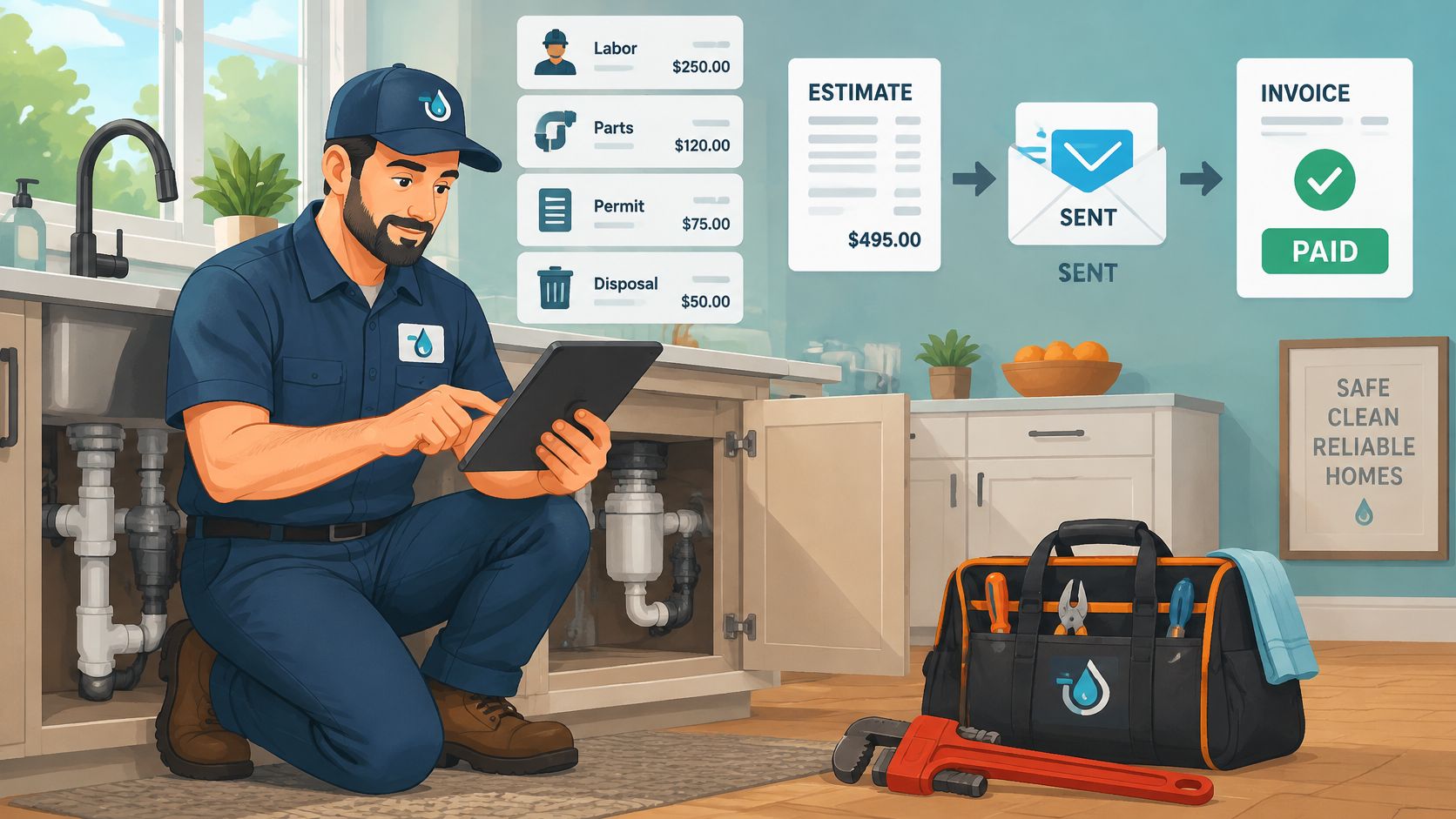
Build the estimate on site. Include labor, parts and applicable permit or disposal charges, with descriptions a customer can understand. A water heater replacement should identify the equipment and included installation work rather than relying on a vague replacement label.
Record customer approval. Send the estimate for approval and preserve the accepted version, approval date and approving person's identity. Editing the scope afterward shouldn't erase what the customer originally accepted.
Collect and allocate the deposit. Where the agreement and applicable rules permit it, set the deposit as a fixed amount or percentage before ordering materials. Confirm that the payment reduces the eventual amount due instead of becoming an unrelated customer credit.
Convert the approved work into an invoice. Pull actual time, parts and approved changes from the job record. Staff should review the difference between estimated and completed work rather than assuming every original line remains correct.
Deliver a payable invoice. Include the due date, accepted payment methods and a system-generated payment link. Confirm the billing contact, particularly when a tenant arranged access but a property manager pays.
Apply payments and reconcile the balance. Record each receipt against the correct invoice and check that the remaining balance is accurate. A payment marked as received isn't necessarily money deposited in the bank, so settlement status should remain visible.
The deposit mistake to catch
The most damaging slip is simple: the customer pays a deposit, but the final invoice doesn't subtract it. Staff then send a bill that effectively charges the deposit twice.
For a sample replacement, the vendor should demonstrate the estimate, approval, deposit receipt, scope change and final payment. The demo should end with a zero balance and a readable transaction history, not just a polished invoice preview.
What Card and ACH Fees Add to Each Invoice
On a $15,000 job, card processing at an illustrative 1% to 3% would cost $150 to $450, matching the range described in Nickel's plumbing-payment material. Those percentages are useful for modeling costs, not a quote for any shortlisted platform.
Payment processing is separate from the subscription. A modest plan charge can still accompany substantial collection costs when a business takes card payments on larger replacements.
Card processing cost at 1% and 3% of invoice value
| Invoice value | Cost at 1% | Cost at 3% |
|---|---|---|
| $1,000 | $10 | $30 |
| $5,000 | $50 | $150 |
| $15,000 | $150 | $450 |
These are hypothetical calculations using the stated percentages and invoice values. They exclude fixed transaction charges, platform fees and other adjustments.
Calculate the actual collection cost
The office manager should apply each quoted rate to the business's own average ticket and expected payment mix. ACH can produce a different cost from cards, but neither method should be assumed free or automatically cheaper without the written terms.
- Subscription record: Record the vendor's plan name, published monthly price, billing commitment and the date the page was read.
- Processing record: Capture card rates, fixed transaction charges, ACH fees, caps and monthly minimums. If no processing figure is published, record that explicitly.
- Customer charges: Confirm whether the platform adds a surcharge and whether the proposed arrangement complies with applicable state and payment-network rules.
- Settlement terms: Ask when funds become available and whether holds, refunds or disputes introduce additional costs.
A processor's advertised percentage isn't necessarily the business's effective cost of accepting payment.
Before signing, the vendor should provide the effective rate for the business's expected monthly card volume in writing, including all processor and platform charges.
Collecting Cash Faster Without Losing Customers
The cash-flow gap runs from completed work to usable money. In a 2025 survey of 1,014 commercial owners and executives, primarily in mechanical, electrical and plumbing businesses, ServiceTitan reported an average of 2 days to send an invoice and 28 days to get paid.
Those are separate delays. Sending promptly addresses the office handoff; clear terms and convenient payment options address collection.

Settings that support collection
- Job-specific terms: Configure deposits and due dates by the work and customer agreement. Completed emergency work shouldn't sit in the same billing queue as an account awaiting purchasing approval.
- Scheduled reminders: Use a defined overdue schedule, with different wording for homeowners and commercial accounts. Pause reminders when staff record a dispute or agreed payment arrangement.
- Partial payments: Allow an authorized partial payment to reduce the balance accurately without making the invoice appear settled.
- Accessible payment links: Include the correct payment link in invoice delivery and related payment messages, with receipts sent automatically.
Longer terms can feel customer-friendly while leaving the contractor funding labor and materials. Terms should reflect the customer relationship and contract, not a default setting nobody reviewed.
Match the settings to revenue
An emergency repair can be collected at the truck after the customer reviews the work. A residential replacement can use an agreed deposit followed by a completion balance. Recurring maintenance can use authorized autopay with clear cancellation and failed-payment handling.
The owner should identify which pattern produces the largest share of revenue. The vendor should then demonstrate reminder timing and exception handling for that group, including what happens when a customer has already paid but settlement is still pending.
Progress Billing and Retainage for Commercial Plumbing
A commercial progress invoice bills the value earned during the project, not automatically the full contract amount. The office must distinguish work completed, amounts previously billed and money still withheld under the contract.
The schedule of values breaks the contract into billable components such as rough-in, fixtures and testing. Each line carries an assigned value and a completion status, giving the customer a basis for reviewing the payment application.
Keep progress and withheld money separate
Procore's progress-billing guide describes payment applications using AIA G703 for itemized continuation lines and AIA G702 for summary totals, with retainage commonly 5% to 10%, subject to the contract and jurisdiction.
Retainage isn't a discount. It's money withheld under the payment arrangement, with release governed by the applicable terms.
Software should preserve distinct fields for:
- Gross completed work: The value earned before withholding.
- Current-period billing: The amount being requested in the present application.
- Cumulative billing: The running amount billed across the project.
- Retainage withheld: The amount held back and tracked separately.
- Retainage released: Previously withheld money now requested or paid.
Approved change orders should connect to the affected scope, and stored materials should remain identifiable. Otherwise, staff may struggle to explain why the contract value changed or whether materials were already included in an earlier application.
Make the demo prove the accounting
The vendor should demonstrate a partial-completion application, a revised approved change order and a final retainage release. Each result should reconcile to the accounting system, including receivables and the remaining contract balance.
Buying condition: A commercial contractor shouldn't accept a spreadsheet workaround for a billing calculation the business depends on every payment cycle.
Failure in these workflows can distort revenue reporting, receivables or cash forecasts. A general invoice editor isn't enough if it can't preserve the underlying progress-billing records.
Fraud Controls and Invoice Security to Verify
Accepting cards or ACH doesn't mean the business is protected against invoice fraud. A criminal can impersonate the contractor, send replacement bank details or use a compromised email account to redirect a legitimate payment.
Payment acceptance and payment security are separate buying questions. An attractive payment page doesn't establish who can change the receiving account or how staff will detect an unauthorized edit.
Verify changes outside the email thread
- Payment-detail verification: Confirm bank-detail changes by calling a trusted number already on file, not a number included in the change request.
- Audit history: Require records showing who created, edited, voided or reissued an invoice.
- Role permissions: Give technicians the access needed to bill work without automatically allowing changes to banking details.
- Identity checks: Establish a process for customers requesting account or payment changes.
- Controlled payment links: Prefer links generated through the vendor's system rather than manually substituted payment instructions.
The office should also ask what happens after an administrator's email account is compromised. Controls should cover access recovery, notification of sensitive changes and review of affected transactions.
Separate document delivery from e-invoicing
Some business customers may require structured invoice formats that their accounting systems can process. An emailed PDF isn't automatically equivalent to a structured e-invoice, and format compatibility doesn't by itself establish compliance with local requirements.
A written demo response should address three separate areas: ordinary invoice creation and payment tracking, fraud controls and permissions, and structured e-invoice readiness. For the last area, the vendor should identify supported formats and applicable jurisdictions rather than offering a general compliance promise.
Matching Software to Crew Size and Trade
Headline pricing can describe a single account while the actual purchase includes technicians, office staff, add-ons and implementation. The comparison should use the whole crew's cost, not the smallest advertised starting point.
Housecall Pro, Jobber, ServiceM8, GorillaDesk, Workiz, Contractor Foreman and ServiceTitan are names to put on an evaluation list. Their inclusion alone doesn't establish that a particular plan supports plumbing deposits, commercial applications or the required crew size.
Software questions by crew size
| Crew size | Pricing question to answer | Invoice feature to confirm |
|---|---|---|
| One to three technicians | Is the price per account or per user? | Mobile invoicing and card payment at the job site |
| Four to ten technicians | How many users and add-ons are included? | Role permissions and deposit tracking for each crew member |
| Eleven to twenty technicians | Are per-technician limits and setup fees listed? | Progress billing, audit history and data export |
Compare the proposed plan, not the brand
For each candidate, the office should obtain the vendor's own product description and pricing terms for the proposed configuration. The comparison sheet should capture the target trades, intended business size, plan name, monthly cost, billing period, included users and required extras.
A published smaller plan deserves consideration for an owner-operator. Conversely, a lower entry price doesn't help if the necessary invoice controls require another tier or paid module.
Plumbing-specific questions should cover parts lists carried from estimates, after-hours rates and the company's flat-rate pricing book. A service business billing repairs has different priorities from a contractor submitting commercial payment applications.
The shortlist should contain no more than three candidates. Each vendor should demonstrate the same billing scenarios, while the office records confirmed capabilities, exclusions and unresolved questions without assigning an unsupported overall ranking.
Confirm Contract Terms Before You Sign
Data that can't be exported can become a costly exit problem. A plumbing business needs its open balances, payment history and supporting records after leaving a platform, not merely a list of customer names.
The contract review should establish both the cost of joining and the practical ability to leave. Sales assurances should match the vendor's written terms and proposed order.
Put the commitments in writing
Trial conditions. Confirm the trial length, whether a payment card is required and what triggers a paid subscription. Establish whether sample work can be removed before live use.
Seats and billing. Record minimum seats, user definitions, monthly or annual commitment and charges for required modules. Include office access rather than counting technicians alone.
Cancellation and refunds. Identify the notice period, cancellation process, renewal rules and refund policy. A monthly displayed price doesn't necessarily mean a monthly commitment.
Data after cancellation. Confirm export formats, attachment availability, access deadlines and deletion terms. Ask for a sample export that includes invoice lines, payments and outstanding balances.
Migration scope. Specify which customers, open invoices, payments, tax details, service records and attachments transfer. The ERPNext accounting migration guide recommends preserving the original source export, cleaning a separate copy and checking cleaned totals against unchanged source reports.
Payment charges. Attach the written processing schedule and ACH policy to the purchase decision. Confirm any differences between the sales quote, pricing page and processor agreement.
The old system shouldn't be retired until transferred balances reconcile and staff can retrieve the records needed for collection.
The owner or office manager should now bring a representative repair invoice, replacement job and any commercial payment application to the shortlisted vendors. Each vendor should demonstrate the complete billing path and supply the proposed terms in writing. Signing should follow a successful workflow demonstration and contract review, not precede them.