Monday's lawn route is ready, but the office still has a rain skip to settle, an expired card to replace, and a customer who canceled after the next invoice was scheduled. The visits repeat. The desk work hasn't stopped.
Recurring service plan software should connect the promised work to the property, the schedule, and the payment rule. The useful comparison isn't whether a platform supports repeat jobs. It's whether the owner or office manager can handle exceptions without rebuilding the route, checking another spreadsheet, or calling the technician for missing notes.
How Each Platform Handles Recurring Plans
Recurring plan handling by platform
| Platform | Trade fit | Crew fit |
|---|---|---|
| GorillaDesk | Pest, lawn, pool routes | Small route crews |
| Jobber | Mixed home service plus maintenance | Owner plus a small office |
| Housecall Pro | Mixed home service plus maintenance | Small crews |
| ServiceM8 | Light job cards across trades | One truck to a very small crew |
| ServiceTitan | Memberships for larger offices | Bigger crews, not a one-person start |
These are useful demo starting points, not assurances that every required billing rule comes with the entry subscription. A company's trade and crew size narrow the shortlist, but the actual plan must still accommodate the agreement the company sells.
GorillaDesk is the first candidate for a route-heavy pest, lawn, or pool business to examine. The decisive demonstration is a repeating stop that retains its property notes, moves sensibly after a skip, and produces the correct charge without separate office entry.
Jobber belongs on the shortlist for an owner and small office handling both one-off work and scheduled maintenance. Its suitability turns on whether a repair invoice and a recurring agreement can coexist without confusing the customer's balance or the technician's work order.
Housecall Pro is another candidate for mixed home service shops. The office should examine the handoff between the maintenance agreement, the scheduled visit, and any separately authorized repair rather than treating the service-plan label as sufficient proof.
Different jobs need different plan structures
ServiceM8 is a candidate for a one-truck operator or very small crew whose main requirement is a clear job card. A lighter approach makes sense only if the required visit rhythm, customer notices, and collection tasks don't force the owner into a second tracking system.
ServiceTitan belongs in the discussion for a larger office with several dispatchers and a membership program to administer. That buyer should ask for a demonstration involving permissions, dispatch changes, renewals, and account exceptions across office roles.
A weekly mowing arrangement and an HVAC maintenance agreement aren't the same operational problem. Mowing revolves around repeat stops, weather, and route density. HVAC maintenance combines planned visits with equipment records, seasonal capacity, and repairs that may fall outside the agreement.
Fit test: A platform should be judged on what the office must do after the ordinary recurring visit goes wrong.
For every candidate, the buyer needs the vendor's exact name for the recurring feature, its billing trigger, and its routing relationship documented. A recurring invoice can exist without a scheduled visit, while a recurring appointment can exist without automatic collection. Neither alone proves that the full service plan is covered.
What a Recurring Service Plan Records
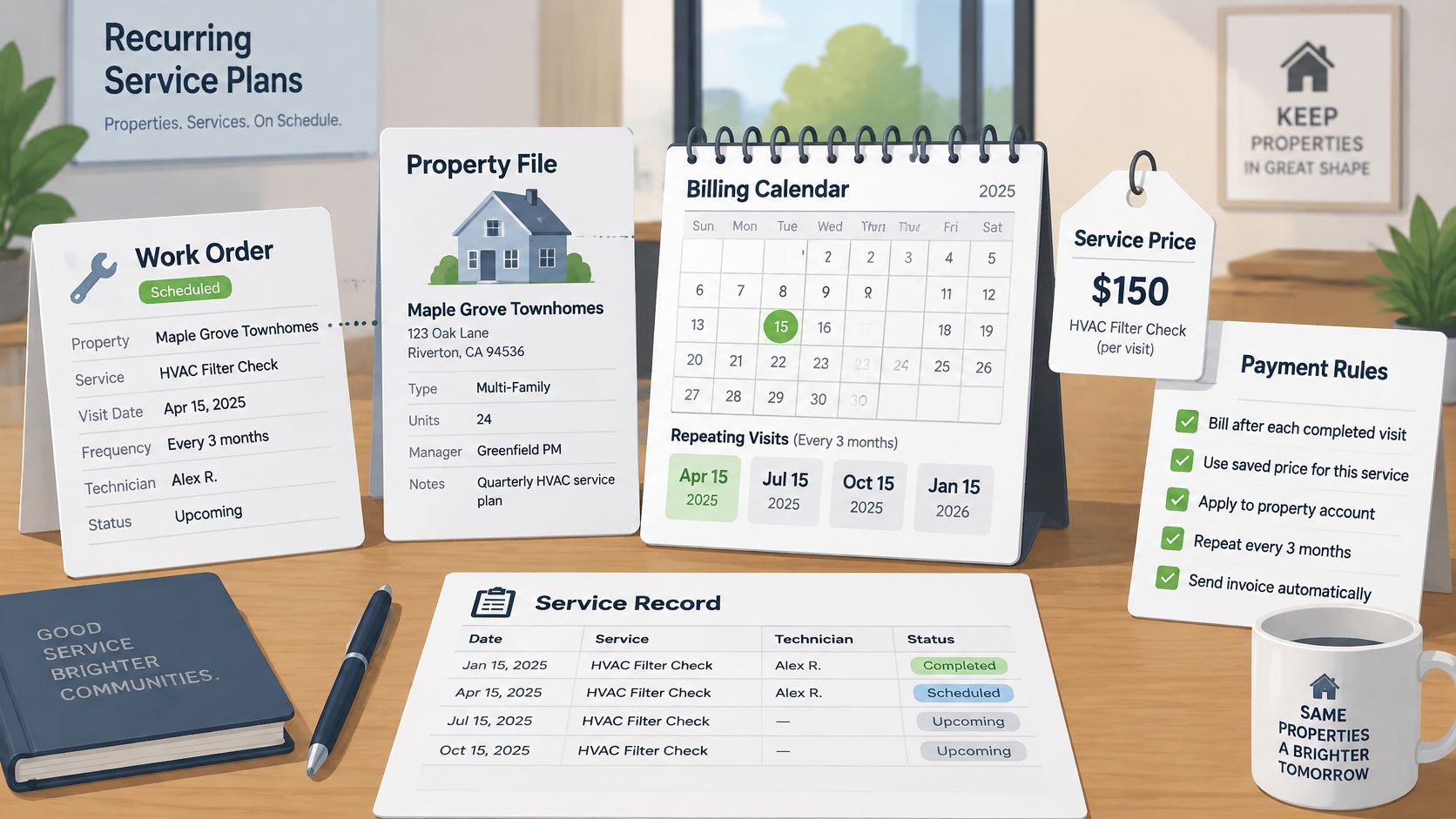
A recurring service plan is a standing work order with a billing calendar, not merely a repeating color on a dispatch screen. Say a pool company agrees to regular maintenance at a customer's rental property. The record must identify the property, the work included, the service rhythm, and the rule that determines when payment is due.
Plan templates establish the service, frequency, and price. Lawn, pest, pool, and cleaning businesses may organize them around repeating visits. HVAC, plumbing, and electrical businesses may organize them around a maintenance agreement with defined inspections and exclusions.
The calendar and service records need to stay connected.
The billing calendar is a separate promise
Billing schedules establish weekly, monthly, quarterly, or seasonal charges. They needn't match the visit schedule: a seasonal maintenance program might be paid in installments even though work happens at particular points in the season.
Proration defines the charge when a customer starts or stops partway through a billing cycle. Deposits cover an initial visit or equipment commitment, while progress billing divides a seasonal program across invoices. Those rules should distinguish money already collected from work still owed.
Reminders then connect the record to daily operations. A visit reminder concerns access and timing; a failed-payment notice concerns collection. The office needs to know which message went out and whether anyone must act.
The plan is the promise of the visits plus the rule for getting paid.
The property record holds the details
Property-level records should retain access instructions, completed work, skipped visits, and balances attributable to that address. A customer with several properties shouldn't require the technician to guess which gate code or service complaint applies.
Clear terms and cancellation records matter, too. As described in Crowell's analysis of recurring-payment requirements, the FTC's 2024 rule addressed material disclosures, informed consent, and simple cancellation, but a federal appeals court vacated it on procedural grounds in July 2025; state automatic-renewal laws, including those in California, Minnesota, Oregon, and Colorado, remain relevant.
The practical requirement is a record of accepted terms, authorization, renewal status, and the instruction to stop future charges. Local legal review should establish the applicable obligations. The software should preserve the evidence and make a skip or failed card visible to the person responsible.
Published Prices and Costs Beside the Sticker
A monthly subscription is the starting cost, not the complete operating bill. Current vendor prices, tier names, processing rates, and read dates aren't verified here, so no price figures or claims that a pricing page publishes no figure are presented for GorillaDesk, Jobber, Housecall Pro, ServiceM8, or ServiceTitan.
A buyer needs a written commercial offer identifying the required subscription, billing commitment, included staff, and any add-on necessary for recurring plans. An entry price is irrelevant if the recurring workflow requires a different tier.
Costs to read on each vendor pricing page
| Cost piece | Where it is published | Why it changes the bill |
|---|---|---|
| Monthly plan | Vendor pricing page, with plan name and price, or an explicit no-figure statement | Sets the floor |
| Extra users or technicians | Seat or user rules on the pricing page | Grows with the crew |
| Card processing | Pricing or payments page | Applies to each card renewal |
| ACH | Pricing or payments page | Changes collection costs and bank-payment handling |
| SMS or reminders | Included-message rules or add-on terms | Route-day message volume affects usage |
| Setup or onboarding | Published fee or written inclusion | Adds an initial expense |
| Export after cancel | Export and cancellation terms | Determines the work and expense of leaving |
Consider a hypothetical 100-member book. A per-technician subscription charge grows as field staff are added, while transaction fees apply as payments run through the processor. Customer reminders, technician notices, and payment messages can create separate usage costs if the subscription doesn't include them.
The office should also distinguish payment volume from collected revenue. A scheduled invoice isn't cash received, and a successful retry shouldn't require someone to reconcile the same balance manually.
Collection work belongs in the cost calculation
Failed-card and ACH handling needs an operating rule: who receives the alert, when another attempt occurs, what notice reaches the customer, and how long the account remains eligible for service. Card and bank-payment failure paths should be demonstrated separately rather than assumed to behave alike.
The office also needs to know whether a delinquent account stays on the route. Automatically continuing visits may be appropriate under the agreement, but it shouldn't happen because nobody saw the failed payment.
Tokenized payment credentials are the appropriate item to discuss with the processor, not a stored security code. The PCI Security Standards Council prohibits retaining card-verification codes after authorization and states that those codes aren't needed for card-on-file or recurring transactions.
Before signing, the owner should obtain written confirmation of who submits recurring charges, what payment information the platform retains, and how customers update their payment method. Payment support responsibilities belong in that answer as well.
A Recurring Job From Sale to Next Visit
A useful workflow assigns responsibility at each handoff. In a small shop, the owner may perform both sales and office tasks, but the record should still show what happened and what remains unresolved.
The office sequence
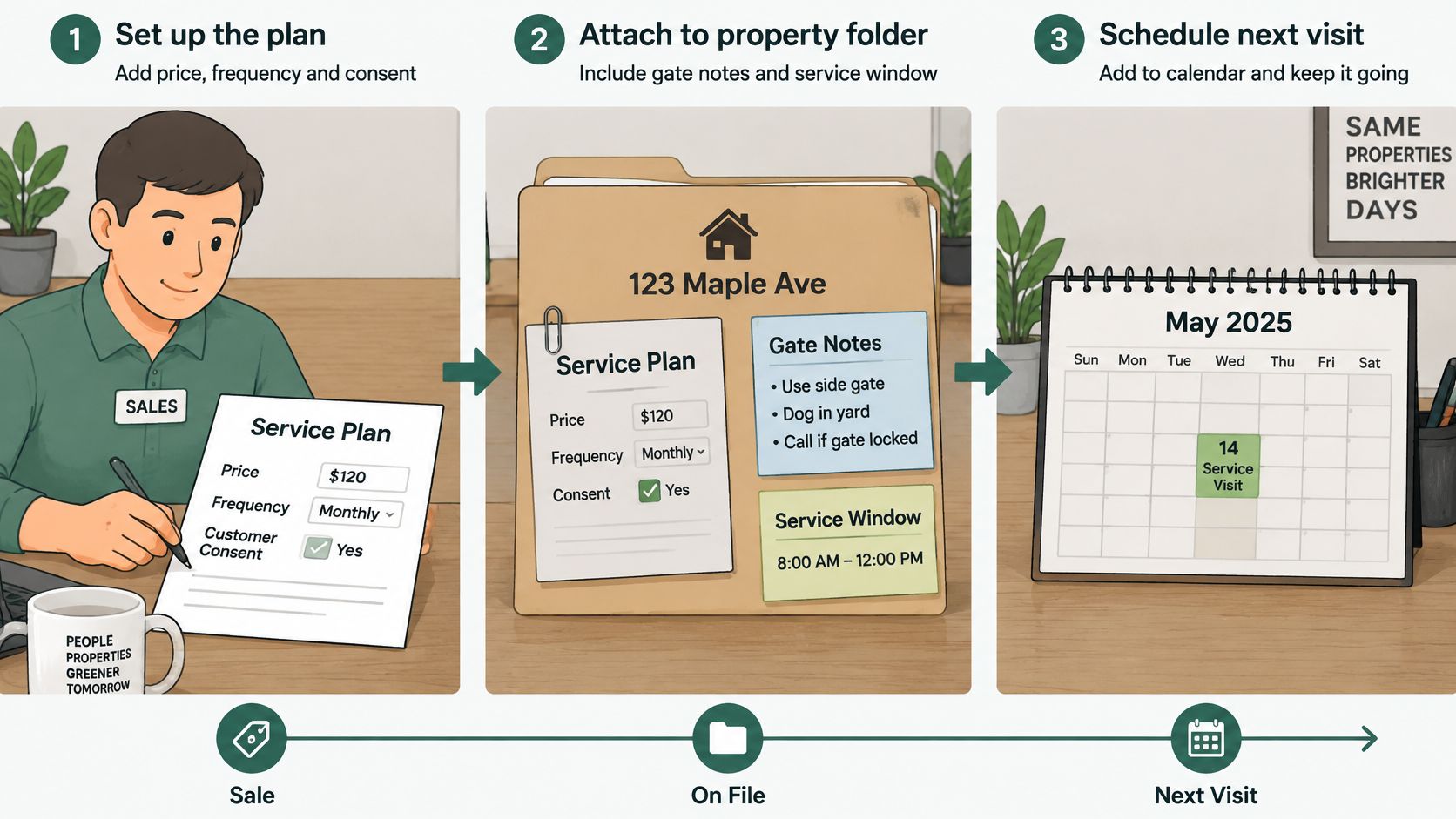
Sell and document the agreement. The owner records the price, service frequency, exclusions, and accepted terms. A verbal promise shouldn't remain separate from the work order.
Attach the plan to the property. The office adds the service address, gate instructions, equipment or treatment notes, and customer availability.
Collect the starting payment. A deposit or first invoice should appear against the agreement so the next employee can distinguish an unpaid amount from a payment already received.
Place the visit on a workable route. A hard window is a commitment the scheduler must preserve. A soft window permits a defined adjustment, subject to the company's customer-notification rule.
Send the reminder. The office checks that the notice reflects the actual appointment and gives the customer a clear way to report an access problem.
Record the field outcome. The technician marks the visit complete, skipped, or needing rescheduling. The reason stays with the property rather than disappearing into a private text conversation.
Apply the billing rule. The office bills the agreed cycle, applies any authorized proration, or issues the next seasonal installment. Completion status and billing status remain distinguishable.
Resolve a decline. The designated employee follows the notice and retry process, then decides whether the upcoming visit remains eligible for dispatch.
Close a cancellation. The office stops future charges according to the applicable terms, removes unneeded future work, and retains the transaction and service history.
What changes by trade
Weekly lawn service with a rain skip. The technician records unsuitable ground conditions. The office applies the agreement's skip or make-up rule, and the owner handles any requested credit outside that rule. The next scheduled visit shouldn't shift accidentally just because the missed visit moved.
Quarterly pest service with an inserted stop. The office checks the new property's service window and technician requirements before adding it. Routing is more than geographic sorting: research on vehicle routing with flexible time windows treats customer windows and operational constraints as part of the routing problem. The dispatcher needs to see which existing appointments become impractical.
Seasonal HVAC maintenance billed in parts. The owner defines the covered work, the office schedules the installments, and the technician records equipment findings. A repair recommendation becomes a separate approval task rather than an unexplained addition to the maintenance charge.
Automation saves desk time only when exceptions arrive with an owner, a reason, and a next action.
Skips, pauses, and complaints belong in an exception queue. If each one becomes a phone call plus a spreadsheet note, the business has moved administrative work rather than removed it.
Moving Plans Off Spreadsheets and Old Software
A migration is a records project before it's a scheduling project. Importing customer names successfully doesn't establish that the new system knows what work is due, what has been paid, or what the company still owes.
Move the agreement, not just the contact
Export the operating records. The export should include customers, properties, plan prices, frequencies, next-visit dates, open balances, and invoice history. Save an untouched copy before cleaning the working file.
Map agreements to properties. A customer may have several addresses, and an address may have separate lawn and pest services. Each agreement needs its own identifiable record so a change to one service doesn't overwrite another.
Import a small pilot batch. A hypothetical batch of 25 active plans is enough to inspect different schedules without moving the entire book. The office should compare next dates, balances, and service frequencies against the old calendar before accepting the mapping.
Arrange payment-method enrollment. Card credentials shouldn't be treated like ordinary spreadsheet fields. The business should ask whether a processor-supported token transfer is available; otherwise, customers need a secure way to enter their payment method again.
Check historical access. Invoices, payments, refunds, and supporting records must remain readable. The IRS guidance on recording business transactions requires complete, accurate, accessible electronic records and retention for as long as their contents may be material to federal tax administration.
Document the exit arrangements. Before subscribing, the owner should obtain the export format, retention period, and post-cancellation access terms in writing.
Inspect the records that can get left behind
Photos, chemical notes, skipped-visit reasons, and old reminder logs need individual attention. A contact import doesn't prove those attachments or events have moved. For pest, lawn, and pool work, missing treatment history can leave the next technician without useful context.
The office should also inspect inactive and paused plans. An import that reactivates them can create unwanted appointments or charges, even when the active customer list looks correct.
Correct next-visit dates matter more than a tidy contact screen. Wrong dates can produce duplicate work or leave an entire route due at the wrong time.
A practical cutover ends with a one-week parallel run: the old list and new schedule sit side by side while the office checks due work. Only one system should issue live customer messages and charges, preventing the comparison itself from creating duplicates.
Demo Questions for a Small Crew
A useful demonstration shows an employee completing the work, not merely a presenter naming a feature. The owner or office manager should ask the vendor to use realistic properties, service frequencies, and exceptions.
Building the agreement and route
Plan setup: Can the presenter build a weekly lawn plan, a monthly pest plan, and a seasonal HVAC agreement on screen, showing where the visit rhythm differs from the billing rhythm?
Route changes: In a hypothetical schedule of 20 to 50 stops, can the presenter add service windows, insert an urgent job, and show which technician's appointments move?
Visit permissions: Which employees can skip a visit, who approves a credit, and where does the reason remain visible on the property record?
Price changes: Can the presenter apply a mid-season price change to selected active agreements, show its effective date, and demonstrate that historical invoices retain their original amounts?
Customer visibility: Can the presenter show the reminder the customer receives and the corresponding information the technician sees?
Testing the uncomfortable cases
Failed card: Can the presenter simulate a decline and show the customer notice, retry schedule, grace period, staff task, and effect on the next visit?
Failed ACH payment: Can the presenter show the separate bank-payment workflow, including how an unresolved or returned payment appears to the office?
Partial-cycle billing: For a hypothetical agreement beginning halfway through a month, can the presenter show the proposed proration and explain which employee can override it?
Deposits and installments: Can the presenter apply a first-visit deposit and build a hypothetical seasonal program with three payments, without representing each installment as an additional service visit?
Cancellation: Can the presenter cancel a plan, show when future charges stop, and identify any future appointment or invoice that still requires staff action?
Data access: Can the presenter export an agreement with its invoices, payments, refunds, and service history, then explain what remains accessible after the subscription ends?
Establishing responsibility
Exception ownership: Where does an unresolved skip, complaint, or collection problem appear, and how can the office tell who is handling it?
Administrative effort: Which tasks still require staff intervention, and can the presenter complete those tasks without switching to an outside spreadsheet?
Written confirmation: Will the vendor put any answer shown only on a slide into the agreement or a written implementation statement?
A smooth sales demonstration isn't the same as a workable daily process. The buyer should leave with a clear picture of the tasks the owner, office, and technician must still perform.
Pick the Fit for Your Trade and Crew Size
GorillaDesk is the first demo candidate for route-heavy pest, lawn, and pool crews, provided the demonstration connects repeating stops and billing without a second office record. A modest customer book doesn't justify a more expensive subscription because it contains more automation.
Mixed shops should compare Jobber and Housecall Pro against their actual combination of repairs and maintenance. That includes HVAC, plumbing, electrical, cleaning, pressure washing, painting, and handyman businesses. The important distinction is whether an isolated job can sit beside an ongoing agreement without muddling approvals, balances, or the next scheduled visit.
Keep the shortlist proportional to the office
ServiceM8 deserves consideration when a one-truck operator primarily needs organized job cards and a manageable visit rhythm. ServiceTitan belongs with a larger office only when the membership workflow and quoted commitment make sense for the staff available to administer it.
The lower-priced subscription is the better fit when it covers the required frequency, property history, reminders, and payment-exception handling. Without confirmed vendor pricing and packaging, no specific cheaper tier can responsibly be named.
Before choosing, the office should count the previous month's skips, failed payments, reschedules, and cancellations. That count reveals the purchasing priority: a shop handling frequent exceptions needs visible queues and clear ownership more than another reporting screen.
A small crew should buy for the work it must administer, not the feature list it might someday use.
The owner or office manager should book demonstrations with the two closest fits, bring a real route and a difficult account, and ask each vendor to complete the same exception tasks. Signing should wait until the required subscription price, staff allowances, payment terms, export rights, and cancellation arrangements are in writing.