
ServiceM8 publishes deposits and partial or progress invoices on every tier, including the free tier. Jobber and Housecall Pro need plan-specific confirmation on their own pages before a buyer assumes the same controls are included.
For a home-service office, that distinction matters when materials must be ordered before the crew returns. A payment button can collect money, but it doesn't necessarily explain which job phase that money funds, whether it has been applied correctly, or what the customer still owes.
The useful comparison is payment tracking against the approved contract, not how quickly a customer can pay.
Which Platforms Support Deposits and Progress Billing
A week-long exterior restoration or HVAC installation can require equipment, materials, and labor before the final visit. If the office sends only a completion invoice, the business funds those costs until the customer pays.
The software needs to support the billing arrangement the customer approved. Accepting a partial payment isn't the same as creating a progress invoice, and neither establishes that the product can track retainage.
Deposit and progress billing support by platform
The following distinctions separate the stated ServiceM8 inclusion from controls that still need vendor confirmation. An unconfirmed control shouldn't be treated as either an included feature or proof that the platform lacks it.
| Platform | Best fit |
|---|---|
| ServiceM8 | One-person and small crews across home trades. Deposits and partial or progress invoices are listed across every tier, including the free tier. Retainage handling still needs confirmation. |
| Jobber | Growing residential service crews evaluating staged billing alongside everyday service work. Confirm deposit requests, separate progress invoices, plan eligibility, and retainage before purchasing. |
| Housecall Pro | Owner-operators seeking quoting and payments together. Confirm whether the intended plan connects an approved estimate to a deposit and successive invoices, rather than merely accepting partial payments. Retainage needs separate confirmation. |
| Workiz | Small crews that dispatch from the office. Confirm how deposits and successive invoices connect to the dispatched job, and whether retainage has a separate record. |
| GorillaDesk | Recurring pest control routes. Confirm whether project deposits and phase invoices work separately from recurring service charges. Retainage support remains unconfirmed. |
| Thryv | Local service shops seeking a CRM alongside billing. Confirm whether customer-level payment records also preserve job-level deposits, progress billings, and holdbacks. |
| Contractor Foreman | Contractors evaluating software for projects billed in phases. Require confirmation of estimate allocations, cumulative progress invoices, and retainage release on the intended subscription. |
| ServiceTitan | Larger HVAC, plumbing, and electrical crews. Consider it only if its published scope and proposed configuration match the shop's larger job-costing and billing requirements. Confirm each payment control separately. |
These are buying paths, not interchangeable feature promises. A recurring route business and a contractor managing phased installations should ask different questions, even when both need invoicing.
Where a smaller operator should start
ServiceM8 is the clearest starting point for a small operator whose immediate requirement is deposits plus partial or progress invoices. Its free-tier inclusion makes it a lower-subscription-cost starting point than moving directly into a paid, heavier platform merely to split a bill.
That doesn't settle product fit. The office still needs to establish whether customer documents, accounting connections, permissions, and the working devices suit the business.
Jobber and Housecall Pro belong on the shortlist when the owner wants billing within a broader residential-service workflow. Neither should receive credit for a particular billing control until the vendor identifies it on the plan being considered.
Buying rule: A vendor should demonstrate a deposit, a progress invoice, and a remaining contract balance as separate records. A successful card payment alone doesn't prove staged billing.
A multi-crew HVAC or plumbing company can evaluate ServiceTitan when its operational requirements extend beyond straightforward invoicing. A smaller operator shouldn't assume that a larger platform is necessary merely because a job takes several visits.
Deposits Progress Invoices and Retainage Defined
Consider an HVAC replacement that requires equipment ordering, installation, and a return visit for completion. The customer may pay at several points, but each payment event serves a different purpose.
A deposit is collected before the relevant work or purchase. Its description might identify equipment procurement or mobilization. It reduces the customer's outstanding obligation, but receiving cash isn't the same as earning revenue for completed work; the accounting treatment should match the business's accounting policy.
A progress invoice bills an agreed stage or share of the contract while work continues. A final invoice closes the unpaid contract balance after the remaining work and adjustments have been accounted for.
An invoice and a payment aren't interchangeable
A partial payment settles only part of an existing invoice. A progress invoice creates a bill for an agreed portion of the work. Software can support the former without providing the latter.
QuickBooks' construction payment schedule guidance describes deposits, draw schedules, and progress invoicing as ways to align collections with project costs and work completed. For a defensible record, each progress invoice should identify:
- Original estimate: The approved scope and contract reference.
- Cumulative billing: What has already been invoiced.
- Prior payments: What the customer has paid.
- Current milestone: The work or billing period being charged.
- Remaining balance: What hasn't yet been billed or paid, clearly labeled.
A retainer for an ongoing maintenance arrangement is different again. It describes an ongoing agreement, not automatically a deposit against a single installation.
Retainage changes the amount collectible now
Retainage, also called retention, is an agreed holdback released after the relevant completion or acceptance condition. Procore's progress-payment guidance describes retainage as commonly 5% to 10% of a progress payment.
In its illustrative $20,000 job with four equal $5,000 progress invoices and 10% retainage, each invoice produces $4,500 currently due, while $2,000 remains withheld across the job until release.
| Record | Meaning |
|---|---|
| Gross progress billing | Value billed for the relevant work |
| Retainage withheld | Contractual amount not collectible yet |
| Current amount due | Payment requested now |
| Retainage receivable | Withheld balance awaiting release |
A payment policy therefore needs more than an upfront percentage. Taking money without a stated purpose, a job allocation, and an applicable refund or release condition can create disputes even when cash arrives sooner.
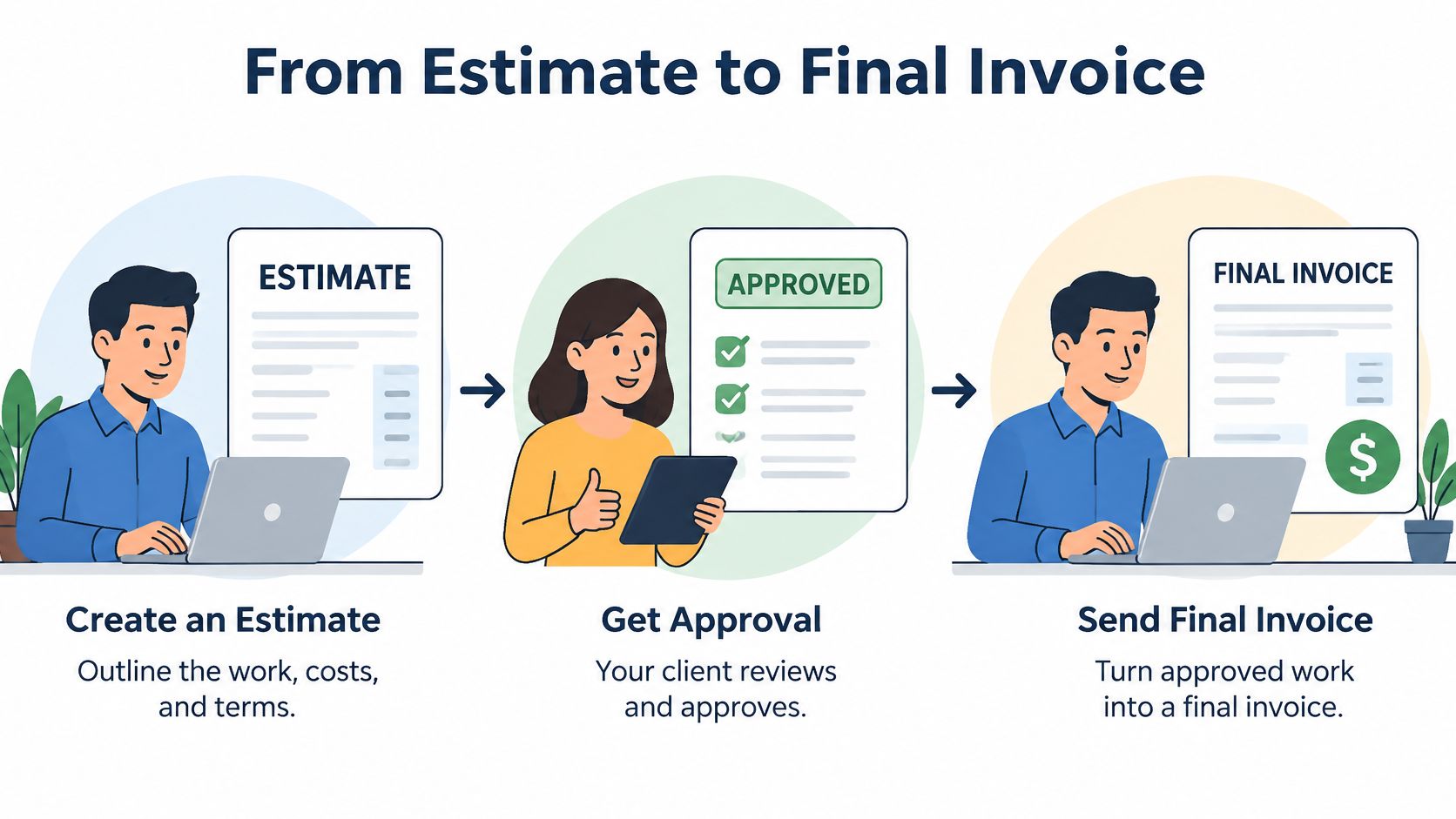
From Estimate to Final Invoice
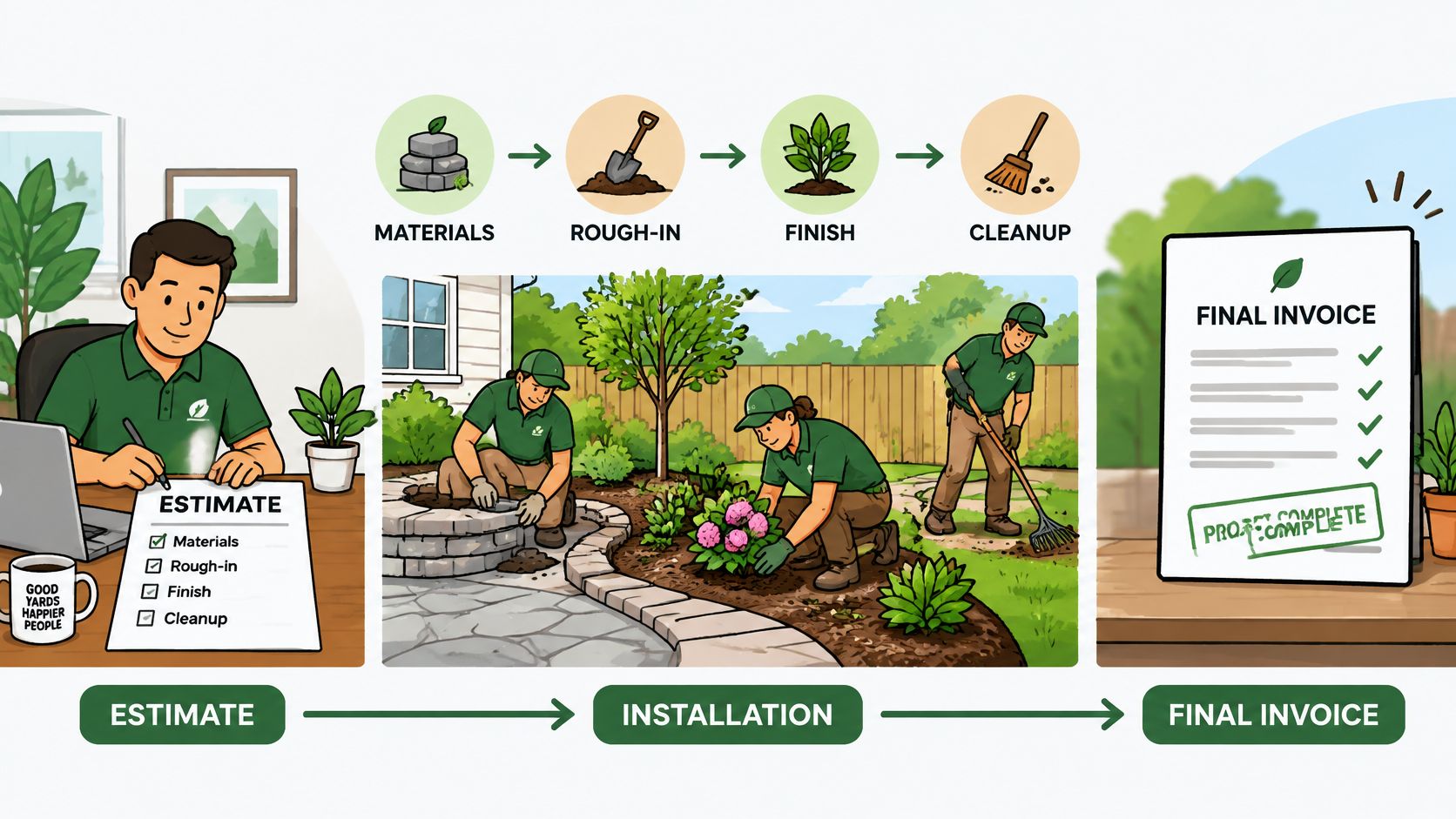
A landscaping installation provides a useful example because procurement and field production happen at different times. Plants may need ordering before excavation begins, while installation and cleanup happen later.
The office should keep the transaction on a single job record rather than recreate the contract in separate documents.
Build the approved payment path
Allocate the estimate to phases. Separate materials, site preparation, installation, and cleanup. Mark the items requiring funding before work begins so the deposit request has an identifiable purpose.
Store the customer's approval. Preserve the signed estimate and its payment schedule on the job. An editable estimate without an approval history leaves the office unable to show which version the customer accepted.
Request and allocate the deposit. Describe the intended purchase or mobilization activity, then apply the receipt to the correct job. Before dispatch, the office should be able to distinguish a requested deposit from a settled payment.
Bill the completed phase or agreed interval. Generate the progress invoice from the approved estimate rather than retyping the amount. Show prior billings so the installation line doesn't get charged again when another employee prepares the next invoice.
These steps also establish who checks completion. The crew may supply photographs and notes, while the office verifies that the contractual billing trigger has occurred before releasing the invoice.
Handle changes and closure without rewriting history
Approve changes before billing them. If the customer adds planting beds, record the added scope and price separately. Approval should precede the increase to the contract total.
Separate any contractual holdback. Present gross earned, retainage withheld, and currently payable as different amounts. Otherwise, the customer may read a holdback as a discount or the office may treat it as an overdue payment.
Close only the unpaid remainder. Prepare the final invoice after checking previous billings, payments, approved changes, and any authorized retainage release. The final document shouldn't restart the contract total.
Resolve cancellation against documented commitments. Review purchased materials, completed work, and the contract's cancellation terms before determining the refundable balance. Preserve the refund and supporting explanation rather than deleting the original receipt.
Construction cash-flow guidance from Out of the Box Advisors emphasizes defined deposit purposes, job-level retainage tracking, and clear mobilization terms. Contract terms and applicable law should govern deductions from a canceled job's deposit, not an informal office rule.
Percentage billing suits installations with measurable production. Interval billing can suit multi-day painting where an exact completion percentage would be difficult to substantiate, provided the customer agreed to that schedule.
Features and Screens the Billing Workflow Needs
A billing demonstration should expose the financial record, not just the customer checkout page. The office manager needs evidence that employees can process ordinary work without changing the contract.
The estimate and job screens
The estimate should convert into successive invoices while preserving the approved total. The job screen should distinguish contract value, invoiced amount, payments received, and remaining balance.
Those labels matter. A remaining amount to invoice isn't necessarily the same as an overdue amount to collect.
- Deposit allocation: A purpose field and a job reference should prevent a receipt from becoming an unexplained customer credit.
- Payment application: Staff should see which invoice received a partial payment and be able to identify an incorrect allocation.
- Progress calculation: Milestone lines or completion percentages should calculate against approved allocations.
- Change approval: Additional scope should carry customer approval before increasing the billable contract.
The customer-facing invoice needs a readable cumulative history. Staff shouldn't need a separate spreadsheet to explain why the current amount differs from the original estimate.
The control and evidence screens
Refund access should follow job responsibilities. A technician who can record completed work doesn't automatically need permission to refund a deposit or change the payment destination.
The record should also preserve:
- Withholding details: Retainage percentage, amount, reason, and later release.
- Approval evidence: Signed estimates, accepted changes, relevant photographs, and timestamps.
- Collection status: Due-date reminders and aging categories that distinguish overdue invoices from intentionally withheld money.
- Recognizable descriptions: Payment requests that name the service or phase rather than leaving the customer to interpret an unexplained charge.
A clean invoice total isn't enough. The office needs to explain how that total was reached after the technician has left the property.
A job with multiple phases may need allocations more precise than a single milestone amount. The American Institute of Architects' subcontractor-payment guidance describes a schedule of values as an itemized allocation of the contract sum across portions of work, with the payment schedule aligned to those allocations under AIA contracts.
That guidance also describes retainage applied across an application or differently by line item. The practical software test is whether phase amounts can remain distinct and whether contractual holdbacks can differ by line without manual invoice adjustments.
A small residential shop may never need a formal payment application. It can still benefit from the underlying discipline: approved scope should determine billing, and billing should determine a traceable balance.
Retainage Due Dates and the Payment Record
A customer's final payment may be lower than the value of completed work if the contract holds back part of the amount until a later condition is met. The office needs a record that separates this retainage from ordinary unpaid invoices, so reminders and balance reports reflect what is due.
Federal examples are models, not residential rules
Federal Acquisition Regulation 52.232-5 provides for progress payments monthly, or more frequently when the contracting officer determines, based on qualifying work completed. This federal construction framework does not set a universal payment schedule for residential plumbing, cleaning, or painting.
For a home-service business, the practical rule is straightforward: any holdback needs a contractual reason and a defined release event. For example, a painter's agreement might specify that a portion of the final payment becomes due after the customer accepts the completed work.
Settings the office should demand
A workable retainage record should include:
- Configurable due dates: Set timing according to the contract and applicable jurisdiction.
- Written withholding reason: Record whether the holdback relates to incomplete work, acceptance, or another contractual condition.
- Separate release transaction: Show when withheld funds are released, without rewriting the final invoice.
- Exportable connections: Keep the adjustment attached to its job, milestone, and supporting correspondence.
A deposit, retainage, and refund affect the balance for different reasons. For a residential painter, the software should preserve those distinctions so the customer's account does not collapse into one unexplained net figure.
Before enabling automatic retainage, the owner should have the contract and local requirements reviewed by an appropriate professional. Software settings should implement the agreement, not create one accidentally.
Price Payment Method and Moving Old Jobs
Subscription price matters only after the required billing workflow is established. A low-cost plan is poor value if the office must maintain a second ledger to track phased work.
For Jobber, Housecall Pro, and the other paid candidates, a purchasing record should contain the vendor's actual plan name, published monthly figure or written quotation, billing commitment, and date checked. No unverified subscription figure should drive the decision.
Separate software cost from collection cost
The owner should compare the cost of the required configuration, not merely the advertised entry plan. Payment processing, additional staff access, accounting connections, and billing add-ons can change the practical expense.
The written proposal should identify:
- Included billing controls: Whether deposits and progress invoices belong to the proposed plan.
- Additional charges: Which required functions or services carry separate fees.
- Payment terms: Processing costs, refund treatment, and any applicable platform charges.
- Exit obligations: Cancellation requirements and continued access to financial records.
Payment method also affects what happens after a mistake. Cards provide a defined dispute process, while recovery of a misdirected bank payment can be difficult after settlement; WEX's business-payment fraud guidance explains why payment verification and recovery controls matter.
Lowest processing cost shouldn't be the only criterion. A changed bank account should be verified through a known contact channel, not accepted solely because an email appears to come from the customer or supplier.
Move balances, not just contacts
Recurring collections need an authorization that matches the agreed billing arrangement and a description the customer will recognize. Stored payment credentials shouldn't become permission to charge an unapproved milestone.
Migration requires a separate financial checklist:
- Open commitments: Approved estimates and accepted change orders.
- Money already received: Deposits and payments allocated to the correct jobs.
- Work already billed: Partially invoiced phases and outstanding receivables.
- Supporting evidence: Customer approvals and relevant payment history.
Migration safeguard: A deposit collected in the old system must not become a new payment request in the replacement system.
The vendor should identify import exclusions in writing. Mid-billing jobs deserve manual reconciliation against the old ledger before customer reminders or automatic collections are enabled.
Questions to Confirm in a Demo
The demonstration should use the subscription and configuration the business would purchase. A feature shown in a different package does not establish that the quoted plan includes it.
The office manager should bring a representative approved estimate, with customer details removed, and ask the vendor to process it on screen. Written answers should accompany anything the demonstration cannot establish.
Require a complete billing exercise
Convert the approved estimate. Create a named deposit and successive phase invoices without charging an estimate line twice. The resulting documents should remain connected to the original approval.
Apply a partial payment. Post a card payment to the intended invoice, then display billed, paid, and still owed together. The vendor should show how an employee corrects a misallocation without erasing history.
Withhold and release retainage. Enter the percentage, dollar amount, and reason, then release it through an identifiable transaction. A manual discount isn't equivalent.
Approve a scope change. Demonstrate the customer approval before the additional amount enters the contract or an invoice.
Cancel and reconcile the job. Determine the unused deposit under the agreed terms, issue the appropriate refund, and export the remaining balance with its payment history.
These exercises reveal whether the office can operate the workflow without unsupported side calculations. They also expose which actions require additional permissions or accounting steps.
Get the commercial answers in writing
The final confirmation should cover more than feature names:
- Plan entitlement: Deposits and progress invoices are included in the quoted subscription rather than an unspecified add-on.
- Account terms: Trial availability, seat minimums, billing commitment, and cancellation conditions are explicit.
- Payment authorization: Stored card or ACH permissions match the billing arrangement and recognizable job phases.
- Record access: The vendor explains what can be exported and what happens to payment history after closure.
The owner or office manager should book a billing-focused demonstration using an actual job structure, require the resulting invoices and payment ledger as exports, and obtain written answers for every unresolved control before committing. The right platform is the one that can explain each payment's purpose, phase, and remaining balance without a second spreadsheet.