It is Monday, the board is already full, and the first text arrives before the coffee is finished. Two customers cancel, a furnace is out, and one technician is still on the first job. The owner is matching names on a paper calendar while the office manager is scrolling a group text. Nobody can say who is free at 11, which window was promised, or which property has the gate code.
That scramble is the job scheduling and dispatch software is built to take off a whiteboard. The rest of this guide walks through what the software does, which features a crew of one to twenty people should demand, how routes and arrival windows really work, and how to break a live demo before anyone signs.
What Scheduling and Dispatch Software Does
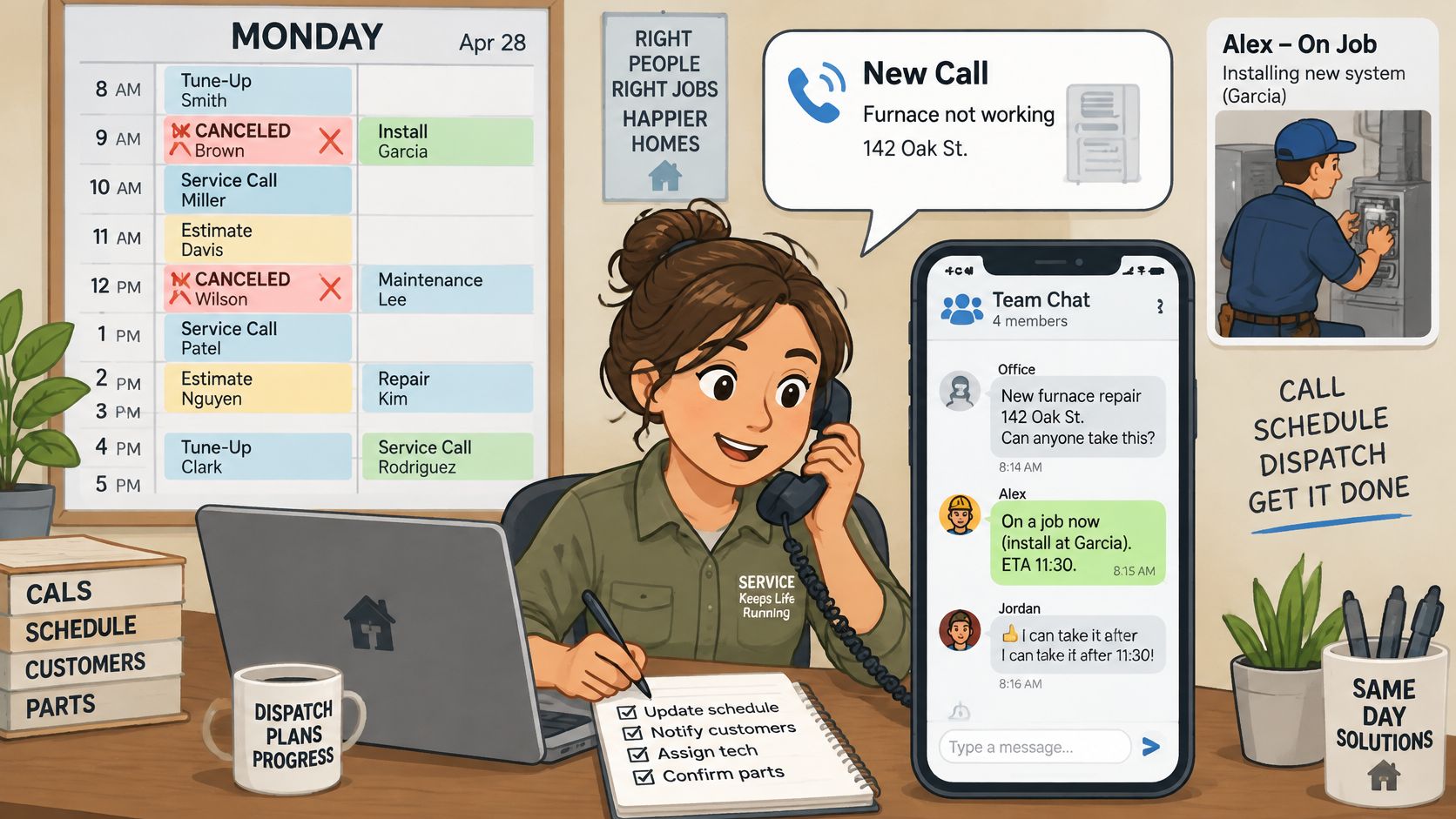
Picture that same Monday with the software in place. The two cancellations free two blocks. The furnace call is marked urgent and dropped onto the nearest qualified technician. The stuck job shows a later finish time, so the next customer gets a new arrival window instead of a surprise.
Scheduling and dispatch software is the system that puts each job on a calendar, assigns it to a person or crew, sends the route and job details to a phone, and records what happened.
Two jobs, one board
Scheduling answers when and who. It holds the week's visits, the technician or crew, and the arrival window the customer was given.
Dispatch answers where next and what changed today. A cancellation, a late job, or an emergency call is a dispatch problem, not a calendar edit.
Think of a dispatcher's board. Pins move when a call comes in, a job runs long, or someone calls in sick. A paper calendar and a group text can't do that without someone rewriting the day by hand. A plain calendar app stores appointments, but it doesn't move work between people, rebuild a route, or attach notes and photos to the visit.
A full field service suite is a different product. It adds accounting, marketing, and call tracking on top of the board. Many small shops need the board first and the extra modules later.
Who uses it each morning
The owner-operator wants fewer missed visits and fewer miles between stops. The office manager builds the day, moves jobs when the morning breaks, and still has to chase payments. Both of them live on the same record, or the day splits into two versions of the truth.
Later sections compare Housecall Pro, Jobber, ServiceM8, GorillaDesk, Workiz, Contractor Foreman, and ServiceTitan on published plan scope, crew size, and trade fit. Names first, prices and demos after the feature list is clear.
Core Features Every Small Crew Needs
A one-person pressure washing business and a fifteen-person HVAC shop share the same daily objects: a visit, a person, a window, and a record of what happened. The table is the shared set. The failure mode sits next to each row so a demo has something to break.
| Feature | What it does | Why a small crew needs it |
|---|---|---|
| Job calendar | Shows every visit by day, technician, and status | Replaces paper and group texts as one schedule |
| Crew assignment | Puts each job on a named technician or crew | Stops double-booking and missed visits |
| Route building | Orders the day's stops to cut drive time | Fewer wasted miles and late starts |
| Time windows | Sets earliest and latest arrival for each job | Gives customers a promise the crew can keep |
| Recurring jobs | Creates visits from one service template | Keeps weekly, monthly, or quarterly work from being forgotten |
| Customer reminders | Sends text or email before arrival | Lowers no-shows and access problems |
| Crew messaging and job notes | Attaches updates and photos to the visit | Keeps field and office on the same record |
| Mobile app with offline mode | Lets technicians view and update jobs without signal | Works in basements, rural lots, and dead zones |
| Property job history | Stores past work by address | Shows equipment, access notes, and earlier findings |
| Visit reporting | Counts completed, missed, and late visits | Shows where the day lost time |
What to poke in a demo
Drag a job to another day and another person. If the old slot stays occupied, the calendar is a picture, not a schedule.
Assign a crew that lacks the skill the job needs. The software should refuse the assignment or warn in a way the dispatcher can't miss.
Build a route and then ask which plan includes it. Some vendors sell route building on a higher tier or as an add-on. If it isn't in the quoted plan, it isn't in the price.
Set a window of 9 to 11 and watch what happens when the prior job can't finish by 9. A window stored only in the job notes won't drive the route.
Generate a recurring visit from one template, then change one week without wiping the series.
Send a reminder, then cancel the job and confirm the reminder stops.
Open the app with the signal off, add a note and a photo, and reconnect. If the note vanishes, basements and rural lots will lose the record.
Open an address and confirm past work, access notes, and photos sit on the property, not only on last month's invoice.
Pull a report of completed, missed, and late visits for one week. If "late" isn't defined, the report can't tell the office where the day slipped.
Small crews most often skip route building, offline mode, and visit reporting because the calendar alone feels like enough. Those three are the ones that show up when a day goes sideways.
Trade-Specific Features by Business Type
A generic calendar can book a plumber and a pool tech on the same afternoon. The records each trade needs are not the same, and a free-text note is a weak place to keep them.
| Trade | Features to confirm | Why it matters |
|---|---|---|
| Pressure washing and exterior cleaning | On-site quote approval, surface notes, before and after photos | Pricing depends on surface area and condition |
| Residential cleaning | Recurring plans, per-visit checklists, access and gate codes | Repeat clients expect the same routine |
| HVAC | Equipment records by serial number, maintenance agreements, seasonal reminders | Service history drives repairs and renewals |
| Plumbing | Emergency priority, parts notes, callback handling | Urgent calls displace planned work |
| Electrical | Permit and inspection dates, panel and circuit notes | Missed inspections cause rework |
| Landscaping and lawn care | Route density, property maps, seasonal service plans | Crews save time by grouping nearby properties |
| Pest control | Treatment logs, follow-up and re-treat dates | Treatment records support follow-up visits |
| Handyman | Flexible task lists, quote-to-job conversion, material notes | Small jobs need fast quoting |
| Painting | Progress billing, deposits, color and surface notes | Multi-stage jobs need staged payments |
| Pool service | Weekly routes, chemical logs, equipment notes | Recurring weekly visits depend on reliable routing |
Test one real customer, not the sample data
Pick one customer the office already knows. For HVAC, that means a furnace with a serial number, a filter size, and a maintenance agreement end date. For cleaning, it means a gate code and a checklist the same tech can follow next week. For painting, it means a deposit already collected and a color note tied to a room.
Ask the vendor to enter that record during the demo. Then look at the screen, not the slide.
Practical rule: If the serial number, gate code, permit date, or chemical reading only lives in a notes box, the next person will miss it.
A structured field can be searched, reported, and required before the job is closed. A note cannot. GorillaDesk is often discussed for pest routes and treatment follow-ups, ServiceM8 for trades that live on the phone, and Jobber or Housecall Pro for mixed home-service schedules. None of that matters if the field the trade needs isn't a real field.
How Route Building and Time Windows Work
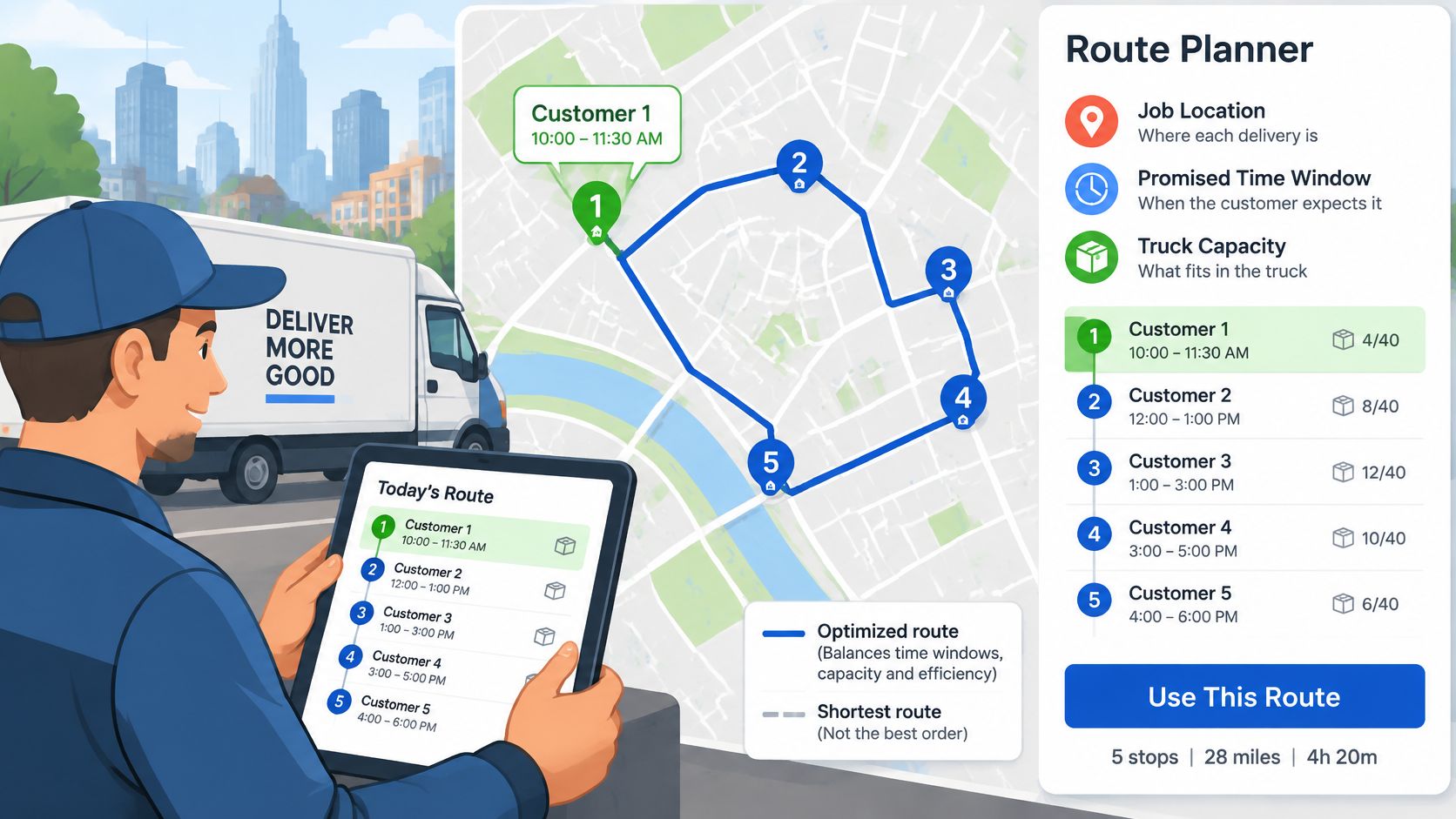
A driver has five stops. The shortest path hits the far side of town first and the noon-only customer last. The truck saves miles and misses the promise. Home service days fail the same way.
Three numbers, not one map
Routing has to weigh three things at once: each job's arrival window, the time on site, and drive time between stops inside the working day. A route is workable only when every technician can reach each job inside its window and still finish before the day ends.
Classic work on the vehicle routing problem with time windows treats this as a constrained shortest path, not a sort by distance. Each appointment has an earliest and latest service time, and the model also has to respect technician capacity, travel time, and service duration. Exact methods have been tested on benchmark instances of up to 100 customers, and the useful lesson for a small crew is that assignment and sequence have to be solved together, as described in Operations Research on the vehicle routing problem with time windows.
Read a planned route stop by stop, not as a total mileage number.
- Planned arrival: the clock time the software expects the tech to reach the property.
- Buffer minutes: spare time before the window closes.
- Finish time: arrival plus on-site work, still inside the workday.
A low-mileage route can still show arrivals after the windows close. Read time per stop. Don't trust the total distance.
What has to be a field
Drive time, setup time, and service duration should be stored as separate estimates. When a tech is late, the office can see which estimate was wrong. Arrival windows, on-site duration, technician skills, and working hours belong in structured fields, not in a note.
Ask whether windows are hard limits or soft targets, and whether skills and territories stay enforced when the planner reorders stops. A map-based sequence that ignores a license or a neighborhood rule will look tidy and still be unusable.
Track the share of jobs finished inside the promised window, and read that next to drive time and idle time. Cutting miles alone can create late arrivals or empty gaps between jobs.
Pricing, Seat Limits and Contract Terms
The headline price is rarely the monthly bill. A plan advertised for "the team" may count only one login, then charge again for the dispatcher, the office manager, and every technician. Route optimization, card fees, and a setup charge sit outside that number.
Compare Housecall Pro, Jobber, ServiceM8, GorillaDesk, Workiz, Contractor Foreman, and ServiceTitan from each vendor's own pricing page, not from a roundup. Write down the plan name and the monthly or annual figure on the day the page is read. If that page publishes no figure, write "no published figure" and don't guess one. ServiceTitan in particular is often sold on a quote rather than a simple public starter price, so the quote is the price.
Who counts as a seat
Before comparing plans, list the people who will log in.
- Owner-operator: one person may need the office view and the phone app. Confirm the smallest plan allows that, and whether a second login is a second seat.
- Office staff: dispatchers and billing staff often count as users even if they never visit a job.
- Technicians: some plans price per tech, some per user, and some cap crew size inside a tier.
A five-person crew can look cheap on a per-user plan and expensive once the office logins are added, or the reverse on a flat crew plan.
| Cost or term | What to check | Where to confirm |
|---|---|---|
| Base plan price | Plan name and monthly or annual figure | Vendor pricing page, with the reading date |
| Seat or user limits | Whether dispatchers and office staff count as users | Vendor pricing page and written quote |
| Technician count | Limits on crew size within each plan | Vendor pricing page |
| Route optimization | Included in the plan or sold as an add-on | Plan details or written quote |
| Extra users | Price per added seat and any minimum seat count | Vendor pricing page |
| Card and ACH processing | Percentage plus fixed fee per transaction, and any platform fee | Vendor processing terms |
| Setup or onboarding fee | One-time charge and what it covers | Written quote |
| Trial length | Free days and whether a card is required | Vendor website |
| Billing period | Monthly or annual billing and any annual discount | Vendor pricing page |
| Cancellation | Notice period and any early termination fee | Vendor terms of service |
| Data after cancellation | Export format, retrieval time, and deletion date | Written policy before signing |
One written quote for five technicians
Ask each shortlisted vendor for a written quote for a five-technician crew that matches the actual office. Name who logs in, whether route building is included, what card and ACH processing costs, and whether onboarding is a separate fee. Put trial length, billing period, cancellation notice, and data export on that same page.
A cheaper monthly plan is not cheaper if route tools, extra seats, and processing fees are billed beside it.
Annual billing often lowers the monthly figure and lengthens the exit. Read the notice period and any early termination fee in the terms, not in the sales email. Confirm how customer records, attachments, and invoices come out after cancellation, and how long the file stays available.
Matching Vendors to Your Trade and Crew Size
Crew size decides the plan before the feature list does. A tool built for a call center will bury a one-truck shop. A starter plan will stall a dispatcher who is moving fifteen people.
One to three people
Solo owners and teams of one to three should start with entry plans from Jobber, Housecall Pro, ServiceM8, and GorillaDesk. On each vendor's pricing page, check whether the smallest plan covers one user or two, and whether the phone app is usable for a technician who is also the office. If the owner can't build tomorrow's route from the driveway, the desktop board doesn't help.
GorillaDesk is a common look for pest control routes. ServiceM8 fits trades that quote and invoice from the phone. Jobber and Housecall Pro cover a wide mix of cleaning, plumbing, and similar home services at this size.
Roughly three to fifteen
Crews in this range should compare Workiz, Contractor Foreman, Housecall Pro, and Jobber on route tools, seat counts, and recurring-job depth. Those three decide whether the office can keep up when the morning changes. Confirm the route feature is inside the plan being quoted, not a slide from a higher tier.
A real dispatch board
Companies with a dispatcher and a call center should look at ServiceTitan and should ask for the implementation timeline in writing. The business needs someone whose job is the rollout, not a spare hour after the last job.
Trade fit, then the smaller plan
HVAC and plumbing shops with maintenance agreements need equipment history and a way to mark an emergency ahead of the planned route. Cleaning and lawn care businesses with many repeat visits need recurring jobs and dense routes. Pressure washing and handyman work need a quote the customer can approve on site.
If a smaller plan covers the crew count and the fields the trade uses, it is the better buy, even when a larger plan lists more options.
Count an add-on only after it appears on the vendor's own page or on the written quote.
Moving Off Spreadsheets Without Losing Records
The switch fails when old records arrive incomplete, not when the new screen looks unfamiliar. A vendor that says migration is free has not said which records move. Scope changes with the vendor, the old system, and the type of data.
Do the sample before the cutover
- List every record type the business uses: customers, properties, recurring visits, equipment, open invoices, deposits, photos, and notes.
- Export 20 to 30 customers with their properties, recurring jobs, and open invoices. Include one messy record, such as two spellings of the same name.
- Ask for that sample in a trial account, not a promise that "we can import CSV."
- Check the totals, then spot-check five records against the source. Counts that match can still hide a wrong next-visit date.
- Get exclusions in writing. Attachments, photos, and custom fields are the usual gaps.
- Pick a cutover date and keep the old system read-only for a short period so the office can look up anything the import missed.
| Record | Confirm in writing | Risk if missed |
|---|---|---|
| Customer records | Name, contact details, and duplicate handling | Duplicate customers split history and reports |
| Service locations | Multiple properties under one customer | Jobs attached to the wrong site |
| Recurring schedules | Frequency, next visit date, and end dates | Missed or doubled visits |
| Equipment history | Serial numbers, install dates, past repairs | Wrong parts and wrong assumptions on site |
| Open invoices | Balances, due dates, and payment status | Unpaid work goes unbilled |
| Estimates and deposits | Status, approved amounts, and deposit records | Customers see stale quotes |
| Attachments and photos | Whether files transfer and where they sit | Before and after evidence is lost |
| Technician notes | Visit notes with original timestamps | Context for future visits disappears |
| Custom fields | Mapping to the vendor's fields | Data lands in the wrong place or not at all |
Duplicates quietly break the route
The same customer under two spellings becomes two histories. Route reports then undercount that home, and a dispatcher may book both "versions" in one week. Ask how the import matches names, phones, and addresses, and who merges the leftovers.
Don't delete the spreadsheet on go-live morning. Read-only access is the backup when a recurring date or a deposit didn't transfer.
Run the Demo Before You Sign
A feature tour is not a working day. Ask the vendor to build the schedule from the shop's own job list for one crew, then break it. The first question is what the board does when the morning stops matching the plan.
Travel time is a risk, not a fixed input. Research on time-window routing uses real travel-time patterns and aims to cut the chance of missing a customer's window while holding transportation cost down. Those models showed materially better on-time performance than fixed travel estimates, with only a modest extra cost, in work published in Operations Research on robust vehicle routing with time windows. Traffic, parking, and a job that runs long make a single drive-time number unreliable for HVAC, plumbing, and electrical work.
Three disruptions, same job list
Run these live, in order, on the schedule just built.
- Extend one morning appointment by 45 minutes. Watch whether later windows move, and whether the customer is told.
- Add a same-day priority call. See if work moves to another qualified technician without dropping a skill or territory limit.
- Cancel a job before noon. Confirm the gap is filled or left on purpose, and that a reminder for the canceled visit does not still go out.
For each change, write down how many steps the dispatcher did by hand and how long the change took. That log matters more than a count of buttons on the screen.
Then check the phone and the clock
Turn the signal off on the mobile app, complete a job or add a note, and turn the signal back on. Changes should sync without a second entry in the office.
Ask how drive estimates are set, and whether planned and actual arrival times sit side by side. Separate estimates for driving, setup, and service time, plus a buffer by area, technician, job type, and time of day, are what make the next week less optimistic than the last one.
Repeat the same three disruptions on two or three shortlisted tools, using the same job list. Housecall Pro, Jobber, Workiz, and the others only become comparable when the test is identical.
Have the technicians who will use the app every day try the same tasks. A board the crew avoids will not improve on-time arrivals, no matter how clean the office screen looks.
A route that is shortest on paper and often misses windows costs more in callbacks, overtime, refunds, and lost trust than a slightly longer day that keeps the promise.
Pull one real week of jobs, list who must log in, and book two demos that start from that list rather than a sample company. Break each schedule the same way, then ask for a written quote that names the plan, the seats, the route add-on, and what happens to the data if the shop cancels.